
OpenAI's April Drop Changed Two Things at Once
GPT-5.5 Thinking and Images 2.0 landed the same day. Here's what changed, what it means for your workflow, and the prompts to run this week, including model selection.

☕ 12-minute read
OpenAI didn’t release one model upgrade in April. They released two on the same day. GPT-5.5 Thinking and ChatGPT Images 2.0 both landed on April 23, 2026.
In most months, a model update touches only one layer. This one touched two simultaneously, the reasoning layer and the visual generation layer, which is a bigger deal than you would think. For L&D practitioners who use ChatGPT as a serious work tool, both upgrades change what constitutes good prompting. If you’re still prompting the way you were six weeks ago, you’re leaving real capability on the table. I covered how to update your prompts in more detail when this dropped. (Click here to read)
Each major release below comes with two ready-to-paste prompts, written for how GPT-5.5 actually responds best: explicit objective, context, inputs, working rules, output format, and a definition of done. Swap in your own details and run them.
📋 TL;DR
🧠 GPT-5.5 Thinking is the new capability ceiling for complex L&D work. Less scaffolding needed, more responsive to a well-structured operating brief.
🎨 ChatGPT Images 2.0 makes training visuals, job aids, and scenario illustrations actually reliable for the first time. Text renders. Multi-image sets hold consistency. Iteration is real work, not rework.
🗂️ Model selection now matters. Standard, Extended, and Pro modes behave differently and serve different tasks. Picking wrong costs you quality, not just time.
📝 The prompting shift is behavioral. “Think step by step” is weaker now. The new pattern is a six-field brief: objective, context, inputs, working rules, output format, and definition of done.
🧠 GPT-5.5 Thinking: What Changed and What It Means for L&D
Released April 23. Available on Plus, Pro, Team, and Enterprise. GPT-5.5 Standard: included in Plus. Extended: available on all paid plans. Pro mode: requires ChatGPT Pro ($200/month). Image generation not available in Pro mode.
GPT-5.5 Thinking is better at holding a goal across multiple steps, tracking what it’s already done, and producing a clean artifact instead of just an answer. It’s stronger at tool use, document analysis, and research synthesis. The reasoning layer genuinely moved.
The behavioral shift is the part worth understanding. You don’t need “think step by step and explain your reasoning” anymore. That prompt is weaker on 5.5. What it responds to now is a clear operating brief with six fields: objective, context, inputs, working rules, output format, and a definition of done. Give it the job. Give it the sources. Give it the guardrails. Tell it what it looks like. Let it work.
That’s a prompting skill shift, not just a model upgrade.
Before we get to the prompts, model selection matters more than it used to.
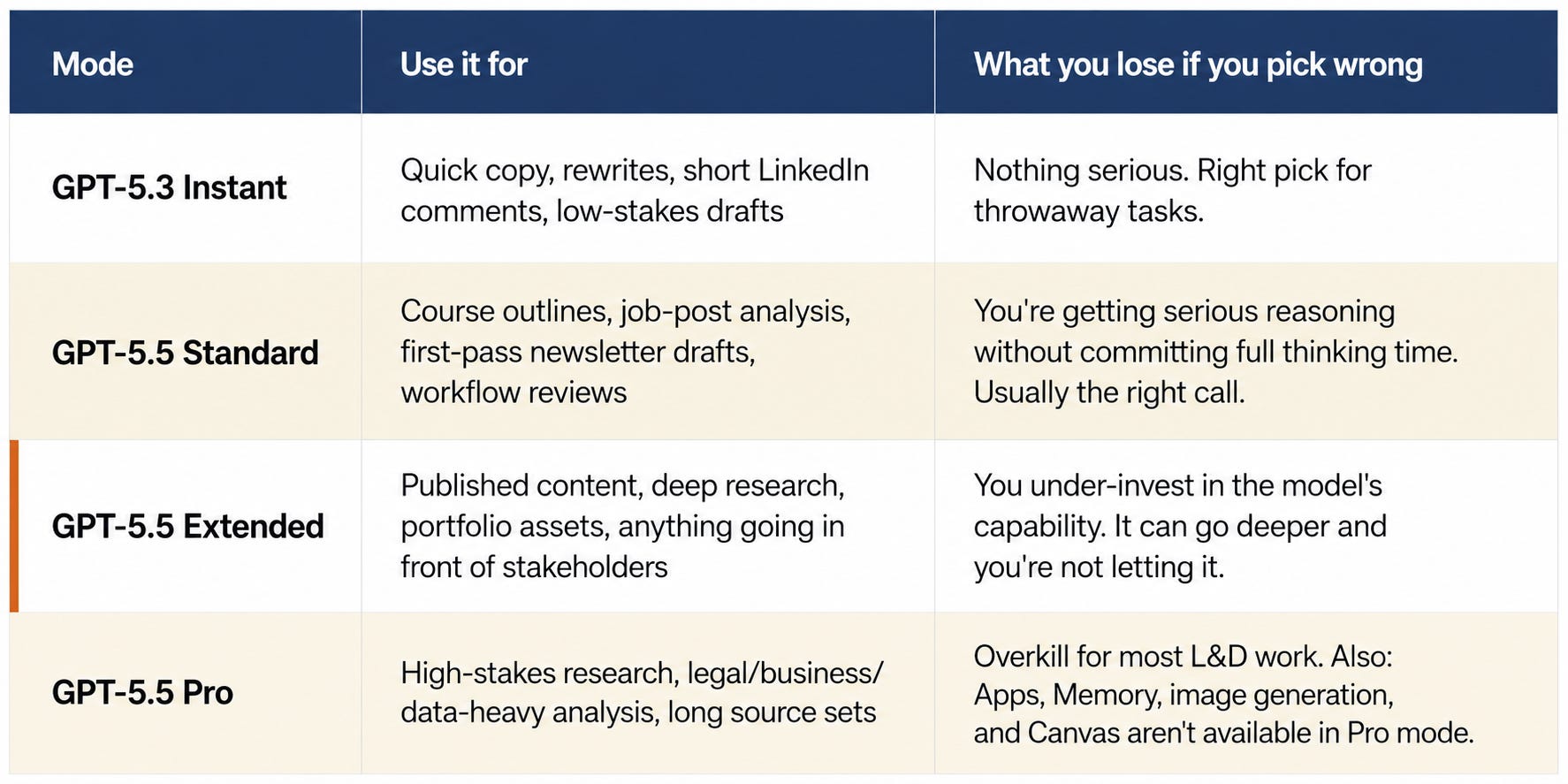
For L&D folks: Reach for Extended when the output goes in front of stakeholders, or the source base is large. Standard for serious-but-bounded work. GPT-5.3 Instant for anything you’d type into a search bar. Pro almost never, unless you’re doing multi-hour research that would otherwise consume an afternoon.
For an Instructional Designer: Turn SME notes into a structured eLearning module outline
Scenario: A subject matter expert just sent you a wall of unstructured notes. You need a buildable module outline before tomorrow’s kickoff call.
Objective:
Convert the attached SME notes into a structured eLearning module outline.

Context:
This is a 30-minute compliance module for onboarding new hire customer success managers.
The SME notes are unstructured -- pull what matters and organize it.

Inputs:
[Paste SME notes here, or attach the document.]

Working rules:
One learning objective per section. Apply Bloom's Taxonomy levels 2-4.
Use Bloom's verb list only -- do not use "understand" or "know."
Do not invent content not in the notes. Flag every gap explicitly.

Output:
Module title, 3-4 section headers, one learning objective per section, key content points per section (bullets), recommended assessment type per section.
End with a Gaps section: any area where the notes don't support an objective.

Definition of done:
Every section has a learning objective and at least two content points grounded in the notes.
For a Learning Manager: Design a repeatable intake-to-launch workflow with quality gates
Scenario: Your team has 12 active projects, 3 IDs, and an SME review bottleneck causing 2-3 week delays on every course. You need a workflow that surfaces the bottleneck and routes around it.
Objective:
Design a repeatable L&D intake-to-launch workflow for a team using Microsoft 365, SharePoint Lists, and Articulate Rise.

Context:
Team size: 3 IDs, 1 manager, 2 coordinators.
Active projects: 12. Single biggest bottleneck: SME review causes 2-3 week delays per project.
The workflow needs to surface that bottleneck and route around it.

Inputs:
[Attach any existing process documentation, tracker screenshots, or team org chart.]

Working rules:
Make this operational, not theoretical. Name the role that owns each gate.
Every failure point must have a named control -- do not list a failure without a mitigation.
SME Review stage must include an escalation trigger for reviews that exceed 5 business days.

Output:
Stage-by-stage table (Stage | Owner | Entry trigger | Quality gate | Common failure | Control).
Separate SharePoint List schema (columns, field types, required vs optional).
Role-responsibility matrix (RACI).

Definition of done:
A team of 3 IDs should be able to run this without manager oversight after two weeks.
🎨 ChatGPT Images 2.0: Why This One Matters More for L&D
Released April 23. Available in Standard and Extended modes. Not available in Pro mode.
Here’s the honest version: the reasoning upgrade matters. But the image upgrade might matter more for the day-to-day work most L&D teams are actually doing.
ChatGPT Images 2.0 improved four things that were real blockers before:
Text rendering is now reliable enough to use in job aids and process maps
Multi-image sets mean you can brief a full carousel or visual system in one session
Reasoning before generation means the model plans the layout before it renders
Instruction following means your detailed visual constraints actually hold
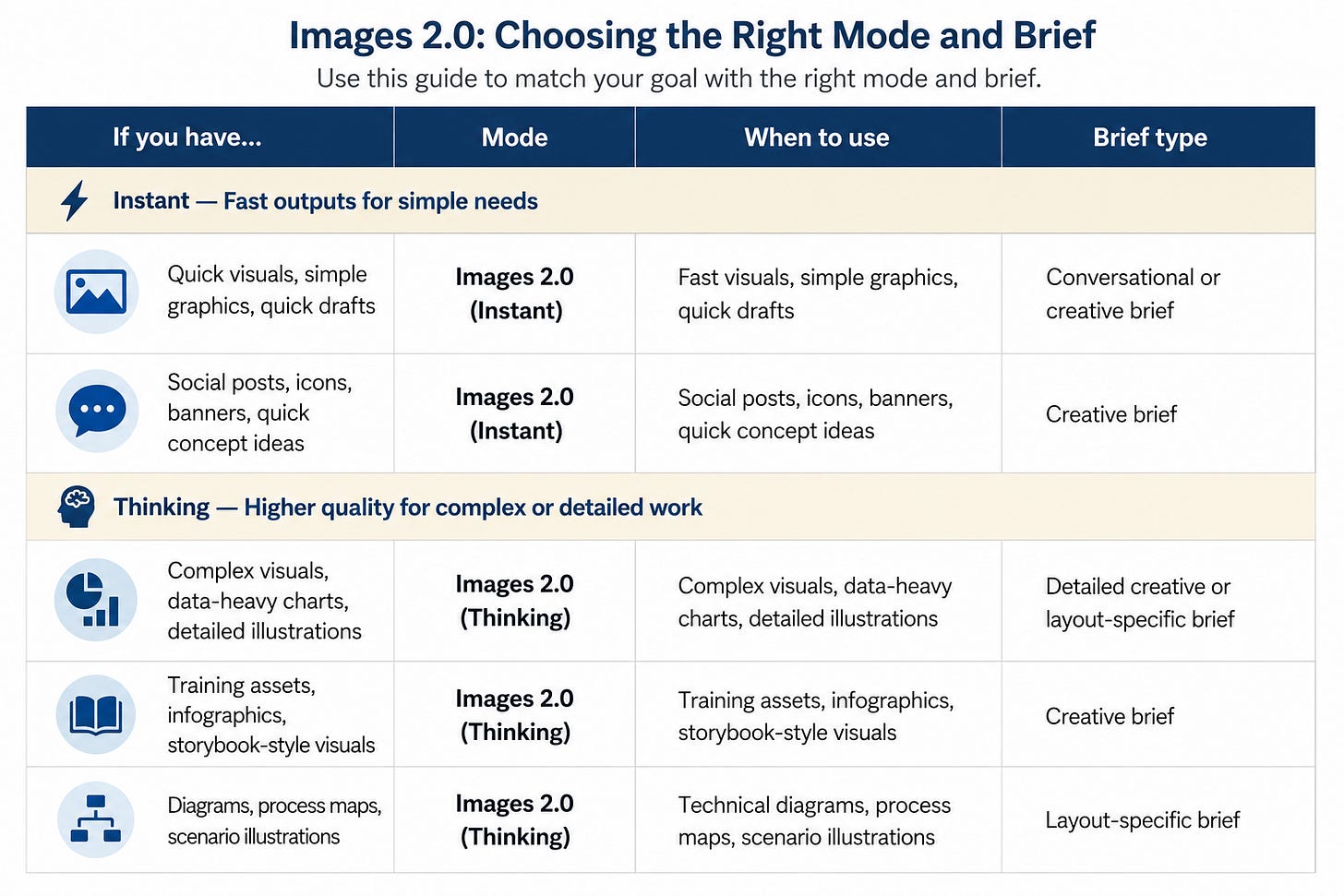
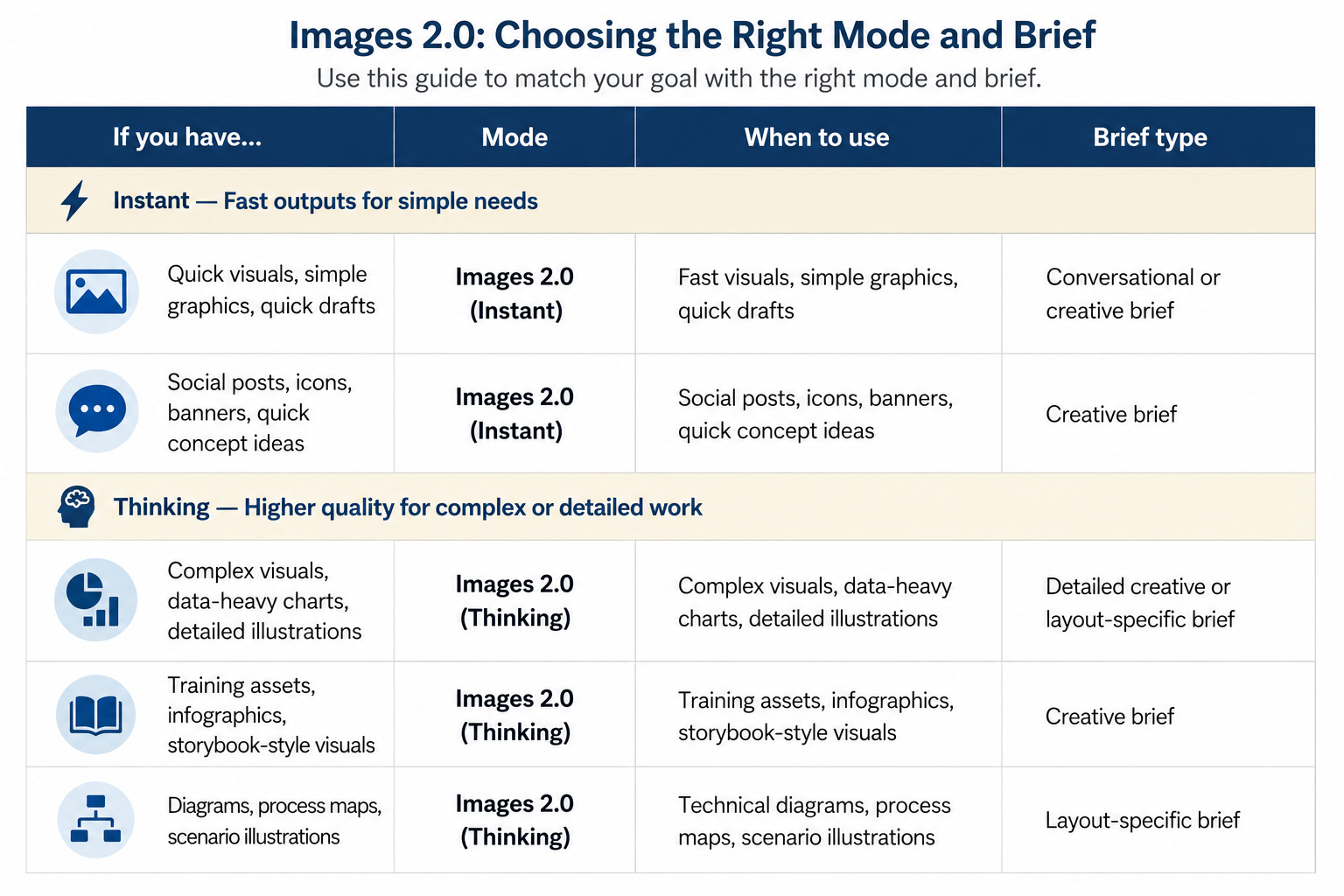
One thing worth noting, honestly: instruction-following is strong in spatial rules, text content, and object placement. It’s weaker on directed character behavior. Getting a person to look at a specific off-center object rather than forward at a camera took four rounds and was never fully resolved. That’s the current frontier. Worth knowing before you brief a scenario sequence.
The old prompting pattern described what you wanted visually. The new pattern is writing a creative brief: Goal, Composition, Style, Palette, Must avoid, Quality bar. Treat it like briefing a designer, not typing a search query.
One more thing worth calling out: the palette you specify matters more than it used to. For editorial illustration and job aids, brand colors work well. For UI-style decision guides and comparison tables, force the palette to match the content’s natural visual logic. Forcing brand colors onto a decision guide produces awkward results. The model understands design system references—“Vercel docs aesthetic” or “Linear changelog style” get you further than describing hex codes in isolation.
For L&D folks: This is the first version of image generation I’d trust for training assets at scale. Not perfect. But reliable enough to be a real production tool, not just a brainstorming toy.
One more thing worth flagging: DALL-E is being shut down on May 12, 2026. If your team uses DALL-E through any third-party tools, integrations, or Make/Zapier automations, those will stop working. Images 2.0 is the replacement. Better time than any to make the switch before it’s forced.
For a Trainer: Scenario illustration for a psychological safety workshop
Scenario: You’re building a leadership development session on psychological safety and need a cover image that captures the emotional tension of deciding to speak up.
Create a 16:9 slide cover image for a leadership development workshop on psychological safety.

Goal:
Convey that speaking up feels risky -- and that's exactly why it matters. The image should hold its own before a room full of skeptical managers.

Composition:
A single person standing at the edge of a geometric platform, looking out at a vast open space. The space beyond is calm and inviting. The platform edge is the tension point -- the moment of deciding to speak.

Style:
Modern editorial illustration. Minimal. Emotionally resonant. Think McKinsey Quarterly meets a Brene Brown book cover. Not stock photography. Not clip art.

Palette:
Deep Slate Blue #2D4A6B background. Copper #B5541F geometric platform edge. Paper White #FAFAF8 figure silhouette. Soft warm light from the open space.

Text:
No text in the image. The facilitator will add the workshop title as a text overlay in Canva.

Must avoid:
No generic corporate meeting scenes. No raised hands. No group huddles. No inspirational sunrise cliches. No motivational poster energy.

Quality bar:
An image a thoughtful leadership development firm would commission -- not download from Shutterstock.
A note on iteration: cover images like this one typically run two rounds. The first generation gets the composition and palette right. The second fixes the figure silhouette or adjusts the lighting ratio. That’s the expected workflow. Not a failure.
For an Instructional Designer: Job aid process map for an LMS enrollment workflow
Scenario: You need a printable one-page job aid that a new learning coordinator can follow on day one without a manager walking them through it.
Create a clean process map for a one-page job aid on the LMS enrollment process.

Goal:
Show the 6-step enrollment workflow so a new coordinator can follow it independently on day one.

Format:
Portrait, optimized for print and digital display. US Letter size.

Composition:
Vertical top-to-bottom flow with labeled blocks and downward arrows:
Step 1: Receive course request
Step 2: Confirm course settings in LMS
Step 3: Upload SCORM/Rise package
Step 4: Set enrollment rules and deadline
Step 5: Send enrollment announcement
Step 6: Monitor completion dashboard

Copper highlight marker on Step 4 -- the most common failure point. Small icon area on the left of each block.

Style:
Clean flat design. Job aid aesthetic -- functional, not decorative. Generous whitespace. Works at A4 print size.

Palette:
White background. Slate Blue #2D4A6B step blocks. Copper #B5541F highlight on Step 4 only. Light Sand #E8D5A3 icon background areas.

Text:
Use exact step labels above. Sub-labels under each step, max 6 words each.

Must avoid:
No decorative gradients. No drop shadows. No rounded corporate icons. Clarity over style.

Quality bar:
A new coordinator follows this correctly on day one without additional explanation.
A note on iteration: a job aid this structured typically runs two rounds. The first generation gets the structure and colors right. The second corrects a label, an arrow, or an icon. That’s a reasonable trade for an asset that previously took a graphic designer half a day.
⚡ Quick Hits
Minor releases from April worth knowing about, even if they don’t change your workflow yet.
Workspace Agents (April 22) — ChatGPT can now run shared, persistent agents that handle repeatable workflows across Slack, Google Drive, Notion, and Salesforce. The practical L&D use case: an agent that pulls completion data from your LMS, summarizes it, and drops a weekly report into a shared Slack channel without you touching it. Memory persists across sessions, so the agent learns your preferences over time. Free until May 6, then credit-based. (Relevant for: L&D leaders and ops-minded IDs building recurring reporting or research workflows)
Codex (April) — Codex is now less of a coding tool and more of a general agentic workspace, closer to how Claude Code works for anyone, not just developers. It can browse the web, comment directly on pages to give precise instructions, connect to your tools, and run multi-step workflows autonomously. If you’ve been curious about AI that does work across multiple apps rather than just answering questions in a chat window, Codex is worth a look. (Relevant for: L&D practitioners ready to move from AI-assisted to AI-autonomous workflows)
🗺️ The New Operating Model
Model selection is no longer just a technical preference. It’s a judgment call that affects the quality of what comes back.
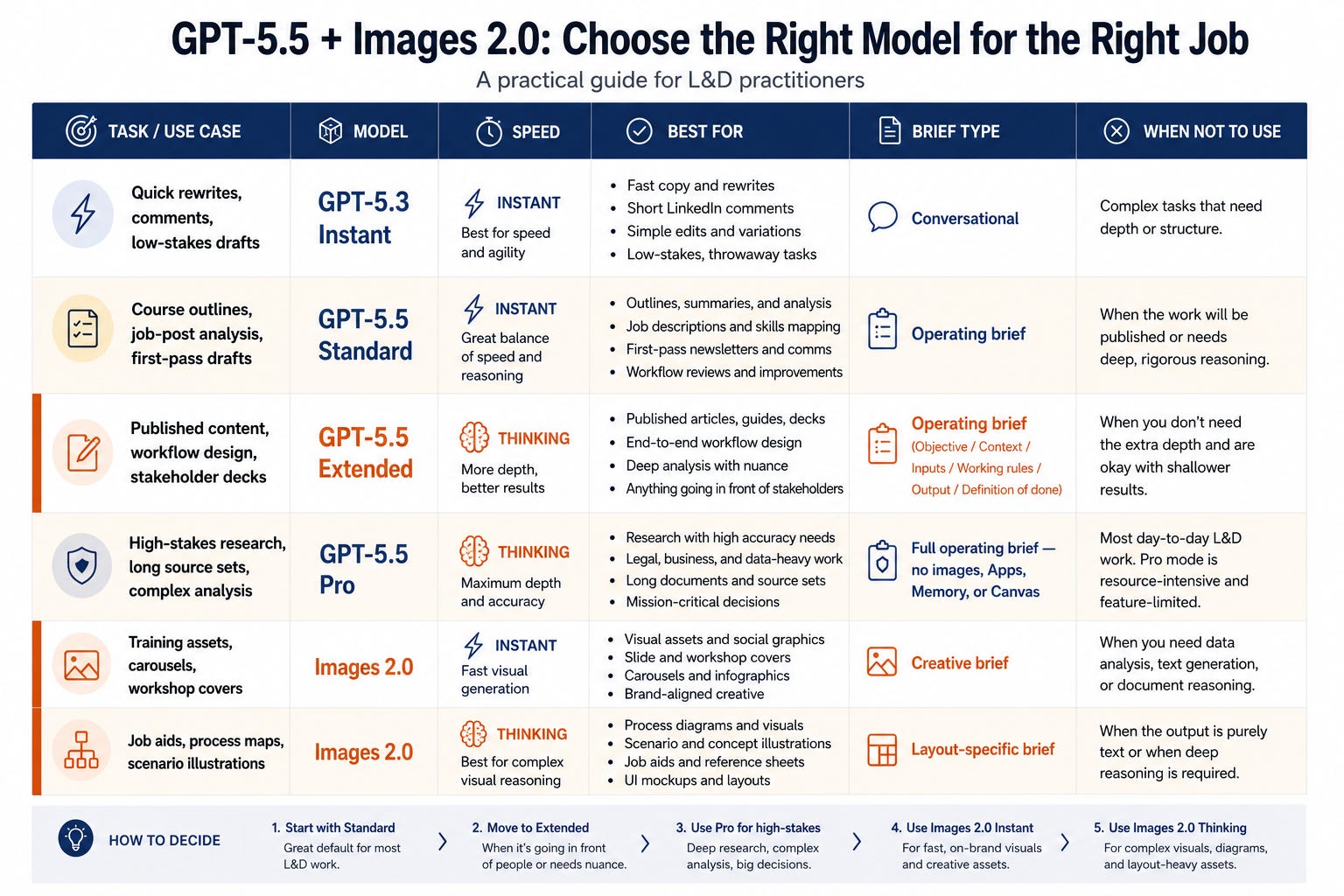
Both models moved forward this month. The limiting factor isn’t the model’s capability anymore. It’s the quality of the brief we give it.
We’re past the point where the model is the bottleneck. The brief is. That’s actually good news, it’s a skill we can build.
🎯 One Thing to Do This Week
Open ChatGPT, switch to Extended mode, and run one of the prompts above on a real piece of work you already have in progress. Don’t test it on a hypothetical. Give it the actual SME notes or the actual workflow problem.
The difference between the prompts in this article and what most people are running isn’t the tool. It’s the brief. That’s where the gap is.
-- Eian