
Google I/O for L&D
What changed, what's in your tier, and prompts ready to use today.

☕ 24-minute read
Google rolled out their I/O 2026 keynote, and I had the same reaction a lot of us probably had. Half excitement, half low-grade dread about another model cycle we have to absorb while we’re already up to our eyes in roadmaps, content debt, and the quarterly review cycle.
Then I started reading the actual blog posts underneath the keynote (Google published a list of 100 announcements, which is its own kind of warning sign), and the picture got clearer. This release isn’t another incremental bump. The shape of how we work with these tools is shifting in a meaningful way, and it lands in our laps as the L&D people who have to decide what’s signal and what’s noise for our teams.
The headline is Gemini 3.5 Flash. The bigger story is everything Google wrapped around it. A 24/7 agent who works in Gmail, Docs, and Calendar. A video model we direct by talking to it. An image tool with object-level precision instead of prompt-and-pray. NotebookLM that generates cinematic videos and editable slide decks from our source material. Voice that turns Docs into a brain-dump partner. Smart glasses arriving this fall. And a subscription overhaul that pulls premium tooling into reach for a lot more of us.
One quick framing note before we go. Many of the Workspace updates that affect our day-to- day were announced at Google Cloud Next on April 22, four weeks before I/O. The press treated them as separate events. From our seat as L&D people, they read as one quarter. I’ll call out which dropped where, so we know what’s already enabled in our org versus what’s still rolling out.
Let’s walk through everything that shipped, which subscription tier each thing lives in, and how to put it to work for our learners this week. The second half of the post is a use-case library: two or three worked prompts for each L&D-relevant product, in the new 3.5 prompting style.
📌 The short version
Gemini 3.5 Flash is here, runs about four times faster than competing frontier models, and the way we should write prompts for it is different from what we were doing last quarter.
Google AI Ultra got restructured: the top tier dropped from $249.99 to $199.99 a month, and there’s a brand-new $99.99 Ultra tier underneath it that unlocks Spark, Deep Think, and priority Antigravity access.
More than a dozen L&D-relevant products shipped or expanded: Gemini 3.5 Flash, Omni Flash, Deep Think, Spark, NotebookLM Cinematic Overviews and slide decks, Notebooks in Gemini, Google Pics, voice in Gmail/Docs/Keep, AI Inbox, Daily Brief, Custom Gems, Information Agents in Search, Stitch, Flow with Omni, and Android XR glasses this fall.
From Cloud Next a month earlier: Workspace Intelligence, Vids with branded AI avatars, Sheets canvas with HubSpot and Salesforce import, “Take Notes for Me” in Meet, Workspace Skills.
💰 The Subscription Overhaul (Get This Right First)
Most of the press coverage on this got muddled, so let’s clean it up. Here’s what changed at I/O.
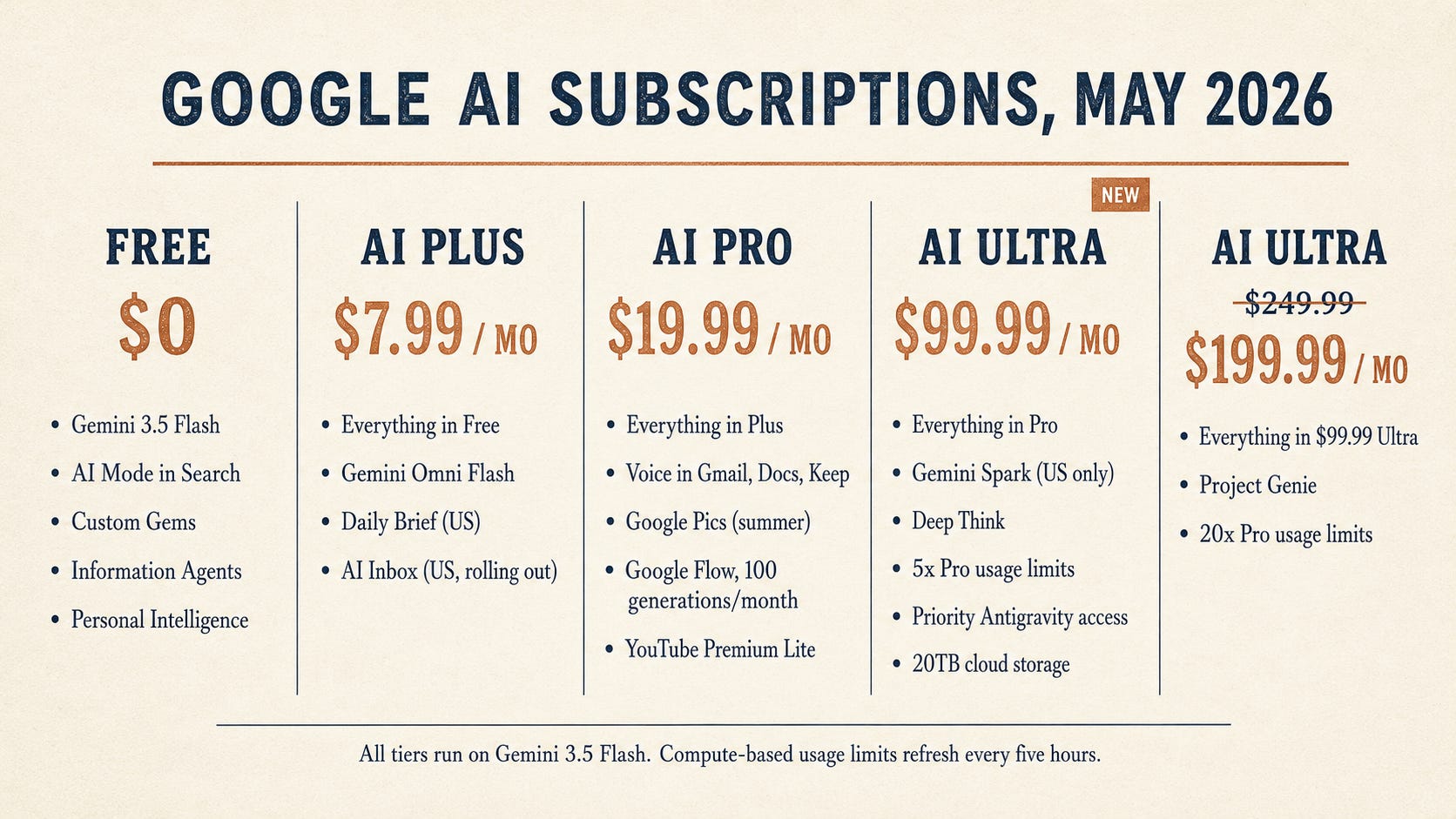
The three free-or-cheap tiers stayed put. Free access to the Gemini app and AI Mode in Search continues, both running on Gemini 3.5 Flash by default. Google AI Plus stays at $7.99 a month. Google AI Pro stays at $19.99 a month.
The big move was at the top end. Google AI Ultra is now two tiers:
AI Ultra $99.99/month is new. It’s aimed at “developers, technical leads, knowledge workers, and advanced creators” (Google’s words). For us, the killer features are Gemini Spark, Deep Think in the Gemini app, NotebookLM Cinematic Video Overviews without watermarks, priority access to Antigravity, and a 5x usage bump over AI Pro.
AI Ultra $199.99/month is the old top tier, dropped from $249.99. Same capabilities as before (20x Pro usage limits, full YouTube Premium, 20TB cloud storage), now with Project Genie access added in.
Google also moved everyone off daily prompt limits onto a “compute-used” model. Complex prompts cost more compute than simple ones, the limit refreshes every 5 hours up to a weekly cap, and if we burn through our cap on the largest models, Google quietly shifts us to smaller ones so we don’t lose access. AI Pro and Ultra subscribers can buy pay-as-you-go top-up credits for Antigravity, Flow, and (coming soon) the Gemini app. This is taking a page out of Anthropic’s book, and OpenAI adapted to this model type earlier this year.
For our world, the practical math: $99.99 Ultra is the new sweet spot for any L&D person who wants Spark, Deep Think, and the agent workflows. $19.99 Pro is still fine for most ID, training, and content work if we don’t need an agent yet. Free or Plus is fine if we’re mostly experimenting in the Gemini app.
🧠 The Prompting Shift Most People Missed (Read This First)
This is the part that’s going to bite us if we don’t pay attention. The use-case examples later in this post follow these rules, so it’s worth grounding here.
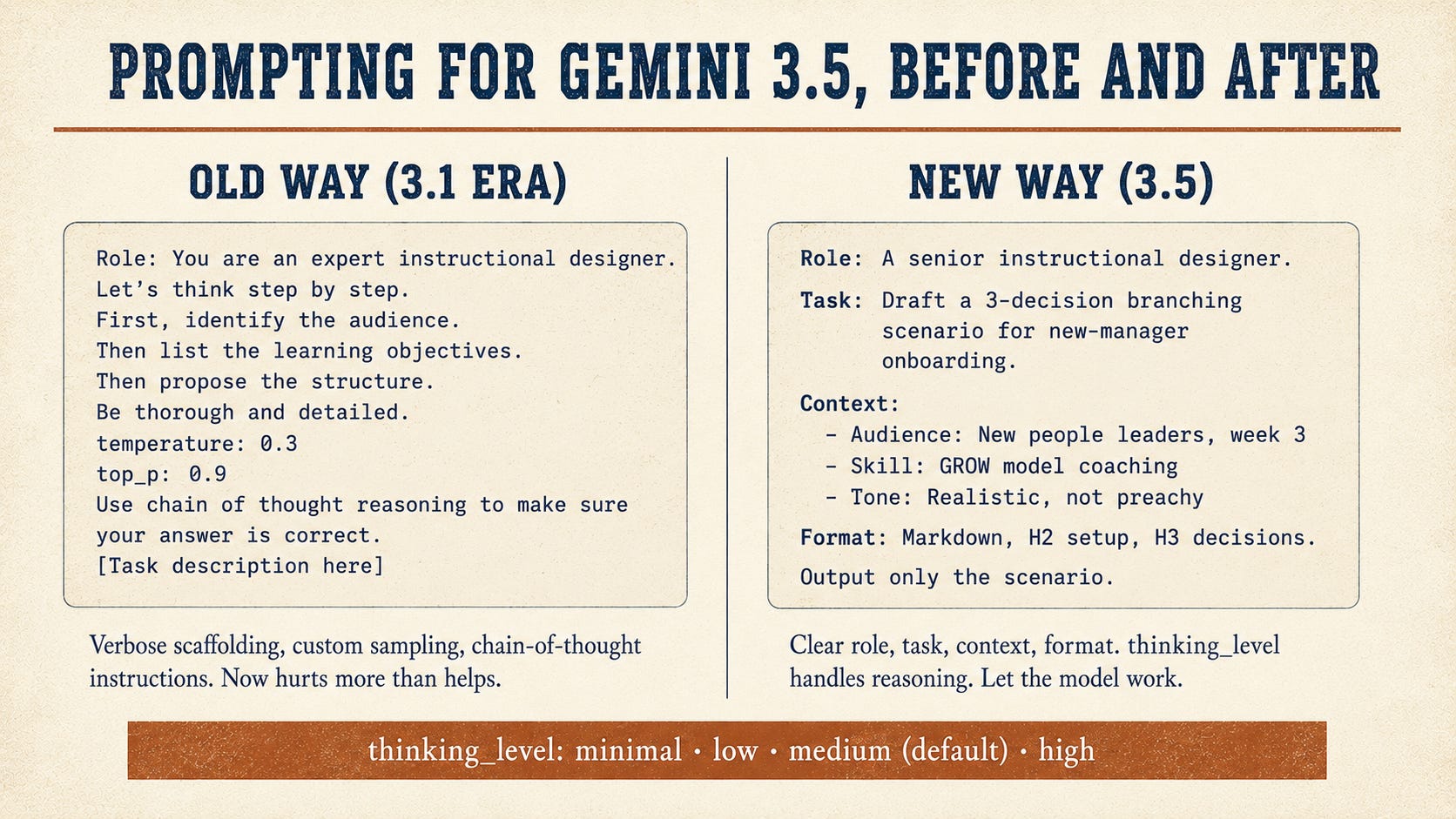
Gemini 3.5 changed how we should be writing prompts, and Google buried the guidance in the developer docs. Short version: the elaborate prompt engineering we were doing for 3.1 is now actively counterproductive for 3.5.
1. Stop scaffolding the chain of thought. If we’ve been writing “let’s think step by step” or building structured reasoning instructions to force the model to slow down, we should stop. 3.5 has reasoning baked in, and a new thinking_level parameter (minimal, low, medium, high) controls it.
minimal: extraction, classification, routing, formatting. Cheap and fast.low: light synthesis, simple drafts, follow-up generation. Default for routine L&D ops work.medium: most L&D drafting tasks. Branching scenarios, course outlines, and SME interview synthesis. This is the new default and what most of us should leave on most of the time.high: heavy analytical work. Curriculum gap analysis across multiple sources, statistical interpretation, and untangling messy data. Use sparingly. It’s expensive.
In the Gemini app, the thinking level surfaces as a toggle on the model picker (Fast / Smart / Deep Think). In the API, it’s the thinking_level parameter. In Spark Skills, you set it when defining the Skill. I’ll call out the level to pick for each example below.
2. Stop tuning temperature, top_p, and top_k. Google’s docs are direct about this. They strongly recommend not changing the sampling parameters from defaults. 3.5’s reasoning is tuned to those defaults, and our tinkering breaks it. If we’ve got a library of prompts with custom temperature settings carried over from 2024, those are now baggage.
3. Simplify. This is the meta-shift. The whole industry spent two years adding scaffolding to compensate for what the models couldn’t do. 3.5 needs less scaffolding, not more. The new pattern is: clear role, clear task, the context the model needs, the format we want, and get out of the way.
There’s also a small but real change for anyone building with the API. Thought preservation is on by default in 3.5, so reasoning context carries forward across turns. This makes multi-step work meaningfully better, but it can increase token usage if we’re not paying attention.
🚀 The Core Models
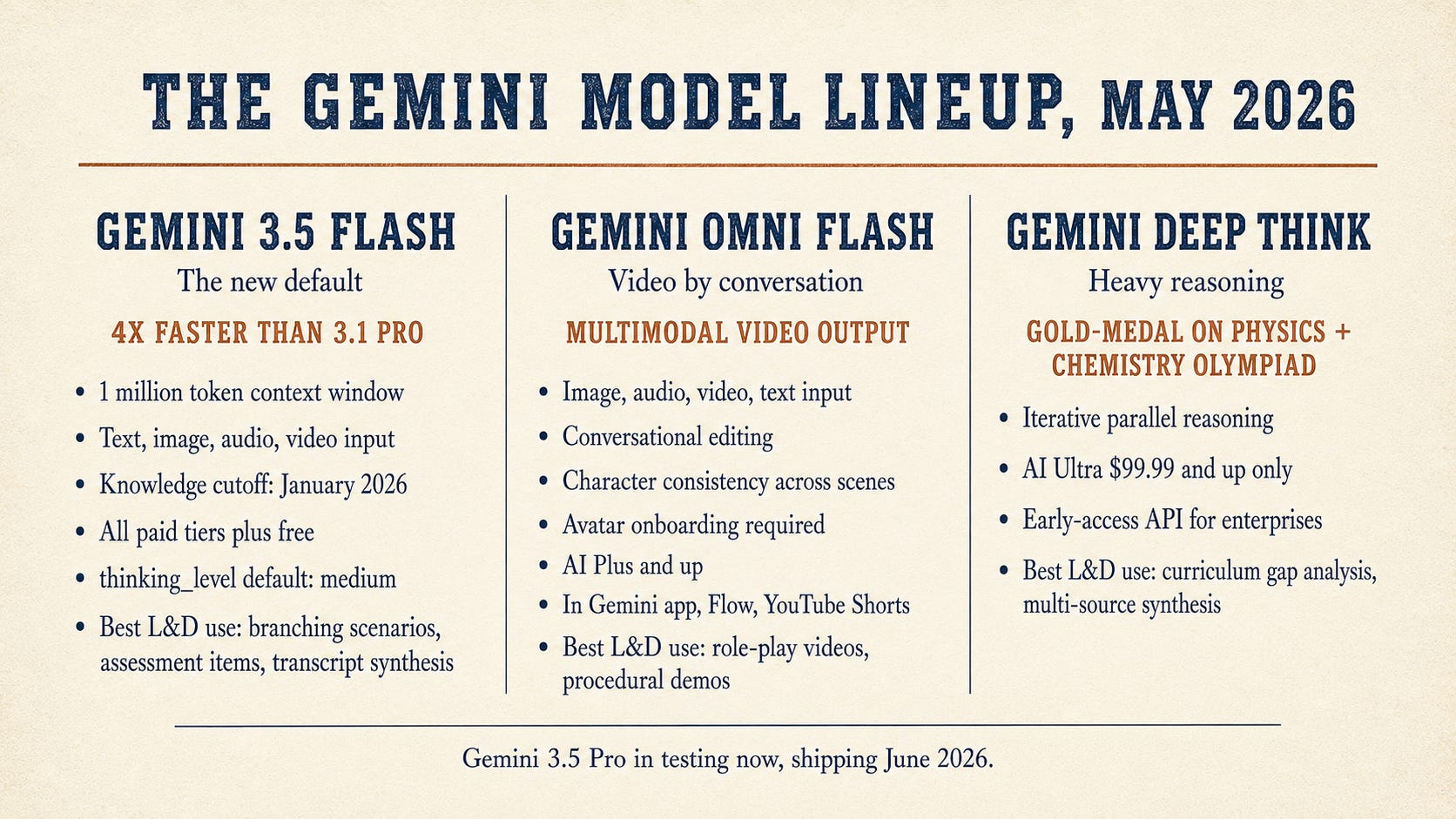
Gemini 3.5 Flash: the new default
Available on: Free Gemini app, AI Mode in Search, AI Plus, Pro, Ultra (global). API for developers.
The first model in the 3.5 series is the only one we can use today. Pro ships next month. Flash beats the old 3.1 Pro on coding and agent benchmarks while running about four times faster. 1 million token context window. Text, image, audio, and video input. Knowledge cutoff January 2026.
Gemini Omni Flash: video by conversation
Available on: AI Plus, Pro, Ultra (global). Rolling out through the Gemini app, Google Flow, and YouTube Shorts.
Takes images, audio, video, and text as input. We edit the video by talking to it. No timeline, no layer panel. Character consistency holds across scenes. We can create digital avatars of ourselves after a quick onboarding.
Gemini Deep Think: heavy reasoning
Available on: AI Ultra $99.99 and $199.99 (in the Gemini app). Early-access API program for enterprises.
An iterative reasoning mode that explores multiple hypotheses in parallel. The I/O upgrade pushed it past math and coding into physics, chemistry, and broader science. Gold-medal scores on the 2025 International Physics and Chemistry Olympiads written sections.
🤖 The Agent Layer

Gemini Spark: 24/7 personal agent
Available on: AI Ultra $99.99 and $199.99 (US only, English only at launch). Workspace business preview coming.
Runs on dedicated Google Cloud VMs. Plugs into Gmail, Docs, Sheets, Slides, Calendar natively. Connects to Canva, OpenTable, Instacart, and others through MCP. Tasks (one-off jobs), Skills (repeatable procedures), Schedules (triggers). Asks permission before high-stakes actions by default.
Information Agents in Search
Available on: AI Mode in Google Search (free, globally, 98 languages).
Persistent background processes that monitor the web on our behalf and surface findings via push notification. No asking required. Continuously running.
Custom Gems
Available on: Free, AI Plus, Pro, Ultra (global).
Reusable Gemini personas with custom instructions and source files. The I/O update made them shareable and tied them to Notebooks for project context.
Managed Agents in the Gemini API
Available on: Gemini API for developers (enterprise pricing).
A remote Linux sandbox where an API-driven agent can plan, call tools, execute code, manage files, and browse the web. For builders only.
Project Mariner
Shut down on May 4, two weeks before I/O. Browser-agent capabilities absorbed into Spark and Chrome’s auto-browse.
🎨 The Creation Tools
NotebookLM: massive upgrade
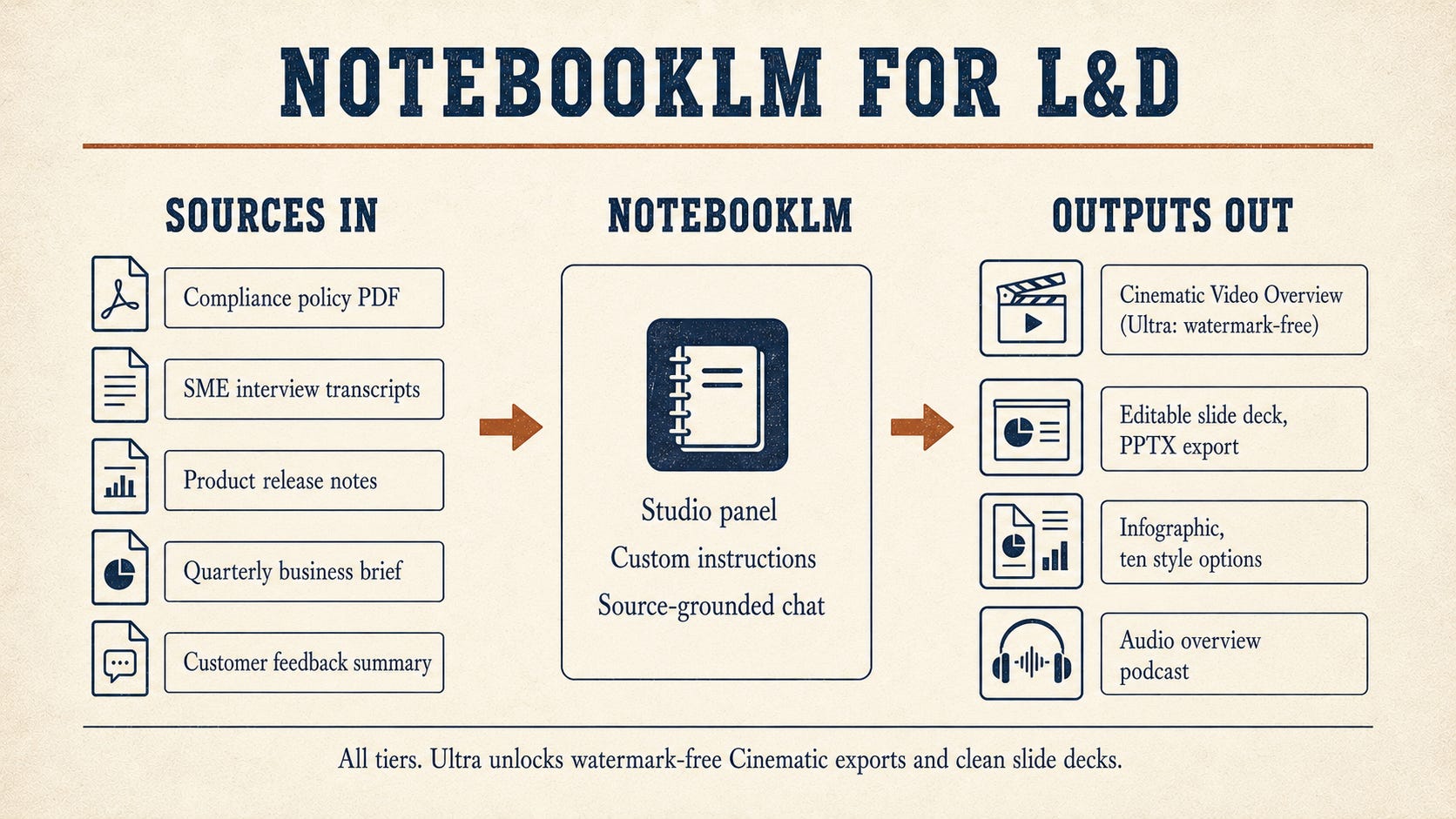
Available on: Free (limited), AI Plus, Pro, Ultra ($99.99 and $199.99). Ultra tiers unlock watermark-free Cinematic Video Overviews and slide decks.
Cinematic Video Overviews use the full Google AI stack (Gemini, Imagen, Veo) as a creative director, not a narrator over slides. Slide Decks support revisions and export as PPTX. Ten new infographic styles.
Notebooks in Gemini
Available on: AI Plus, Pro, and Ultra subscribers on the web. Mobile and free tier are expanding.
Notebooks in the Gemini app sync bidirectionally with NotebookLM. Start a project in either app, the same notebook shows up in the other, with each app’s unique features available.
Google Pics: real image control
Available on: Trusted testers today. AI Pro and Ultra (global) plus Workspace business preview this summer.
Built on Nano Banana 2. Object segmentation, text editing inside the image, built in translation, Workspace integration (Slides, Drive), shareable canvases.
Stitch: AI design tool
Available on: Free, globally. Built on Gemini 3.
A real-time streaming agent renders the UI as we type or talk. Voice Canvas mode. DESIGN.md format for design system capture (open-sourced under Apache 2.0). Exports to Antigravity, AI Studio, or via the Stitch MCP server.
Google Flow with Omni Flash
Available on: AI Pro (100 generations/month) and AI Ultra (highest limits, early Veo 3 access). Now in 140+ countries.
Brought Omni Flash into Flow itself. Veo 3.1 adds richer audio, narrative control, and stronger prompt adherence.
Google Vids with avatars
Available on: Google Workspace (Business Standard and up includes Vids). Avatar update landed at Cloud Next, not I/O.
Veo 3.1, AI music, custom AI avatars with branding (company logo on shirt, branded backdrop). Avatars insert dynamically into imported slides.
✉️ The Workspace Layer (I/O Side)
Voice in Gmail, Docs, and Keep
Available on: AI Pro and Ultra. Preview for Workspace business customers this summer.
Gmail Live for inbox voice search. Docs Live as a conversational co-writer that organizes thoughts and pulls from Gmail/Drive/Chat/web with permission. Keep Live turns brain-dumps into organized notes.
AI Inbox in Gmail
Available on: Was AI Ultra and Workspace Enterprise Plus preview only. Now rolling out to AI Plus and AI Pro subscribers (US).
Personalized draft replies, instant file access, streamlined task management with one-click mark-as-done/dismiss/mark-all-read.
Daily Brief in the Gemini app
Available on: AI Plus, Pro, Ultra (US only).
Morning digest from Gmail, Calendar, and Gemini chats. Top priorities and next steps.
🧱 What Cloud Next Already Shipped (Don’t Forget This)
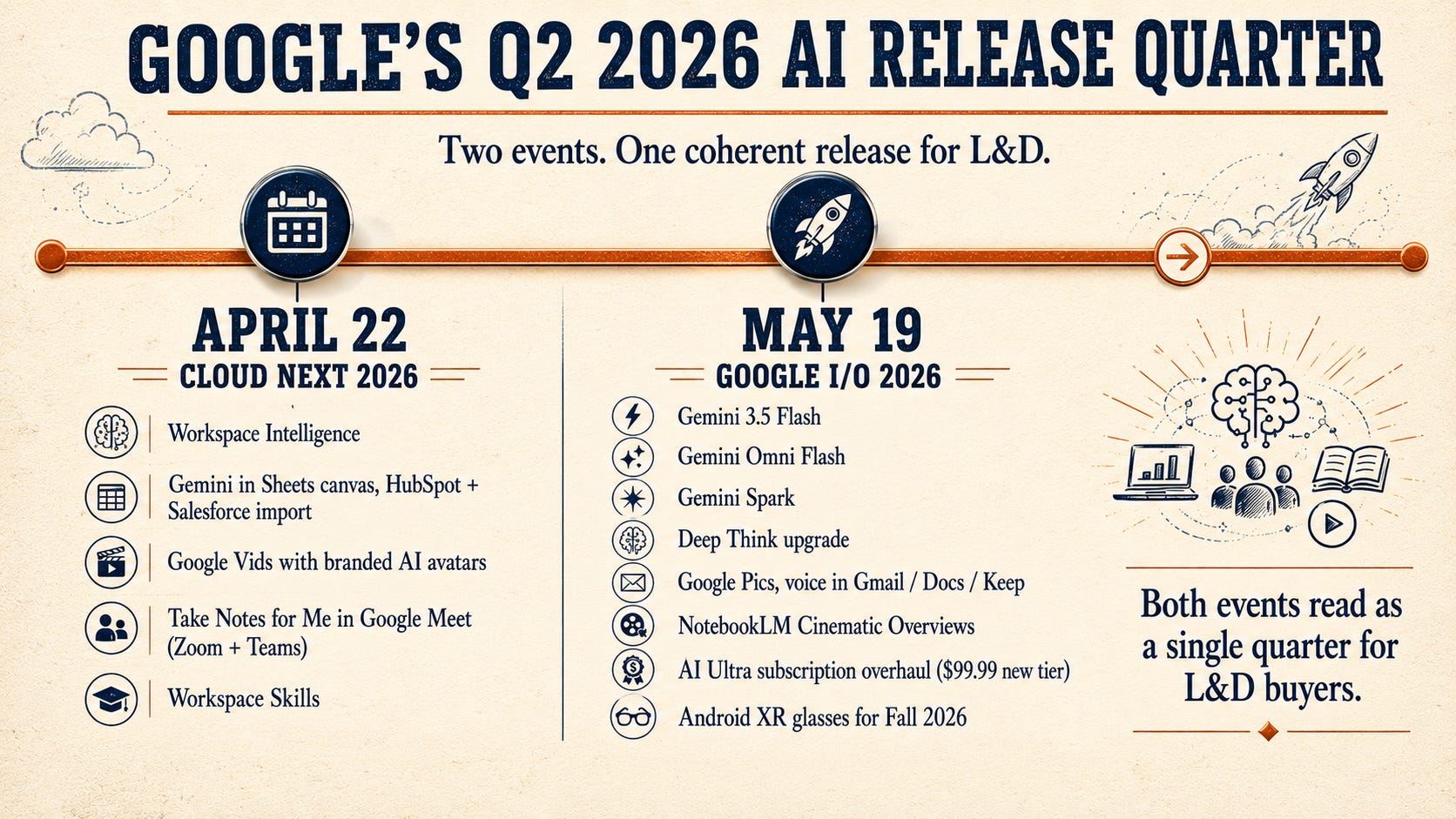
A reminder that the Workspace AI story for this quarter started four weeks earlier than I/O. The Cloud Next 2026 updates are already live or rolling out in most Workspace Business and Enterprise orgs. If our admin enabled them, we can use these today.
Workspace Intelligence. Real-time understanding layer across Workspace apps, projects, collaborators, and org domain knowledge. Powers the agentic behavior that the I/O announcements depend on.
Gemini in Sheets with canvas. State-of-the-art spreadsheet creation and editing. The new Sheets canvas supports interactive visualizations (dashboards, kanban) directly in the sheet, and we can import third-party data from HubSpot and Salesforce.
Google Vids with branded avatars. Custom avatars with branding elements, dynamic insertion when we import from Slides.
“Take Notes for Me” in Google Meet. Meeting summaries and action items for any meeting, including Zoom and Teams.
Workspace Skills. Repeatable agentic automations across teams and workflows.
🔍 Search Changes That Matter for Learners
Personal Intelligence in AI Mode
Available on: Free. Nearly 200 countries, 98 languages.
AI Mode now connects to Gmail, Photos, and Calendar (coming soon). Used to be paid in some surfaces. Now free at scale.
Intelligent Search box
Dynamically expanding, supports text, images, files, videos, and Chrome tabs. Powered by 3.5 Flash.
L&D angle for both: Learners are already doing this. They search a question, get an AI Mode answer that draws from their own Gmail and Drive, and they don’t read the source material anymore. That changes how we design assessments, think about retention, and coach learners to verify information.
🥽 Frontier and Hardware
Android XR Smart Glasses
Available on: Audio glasses ship in Fall 2026. Samsung and Qualcomm. Frames by Gentle Monster and Warby Parker. Pair with Android and iOS.
Audio-only at launch. Display glasses come later. Voice access to Gemini, real-time translation (audio matching the speaker’s voice), text translation in line of sight, summarized notifications, and Calendar.
L&D angle: Field service training, industrial safety, multilingual workforce training. None of it ships next week. All of it is closer than most of us thought.

Project Genie
Available on: AI Ultra $199.99 only (global).
Experimental world model. New I/O capability anchors generated worlds in real Street View locations.
Google Antigravity 2.0
Available on: Free standalone desktop app. AI Ultra priority access (5x usage at $99.99, 20x at $199.99).
Agent-first dev platform. CLI, SDKs, voice, Android/Firebase. Custom subagents, scheduled processes, chained agents.
🏢 Workspace Business Customers (Heads Up)
If our org runs Workspace Business Standard, Plus, or Enterprise, the I/O and Cloud Next announcements overlap. Gemini is already bundled into the seat price. The I/O consumer features (voice, Pics, Spark for Workspace) roll out “in preview for business customers” this summer. The Cloud Next features are already live or rolling out on the admin side now. Pping IT to confirm what’s enabled.
Business Starter is $8.40/user/month, Business Standard is $16.80, Business Plus is $26.40, and Enterprise is custom-priced. Business Standard and up include the full Gemini experience.
🛠️ The Use Case Library

Here’s where we get into the work. Each product gets two or three real L&D scenarios with a prompt or workflow we can use this week. Every prompt follows the new 3.5 simplified style: clear role, task, context, and format. No chain-of-thought scaffolding. No temperature settings. I’ve called out the recommended thinking_level for each.
Using Gemini 3.5 Flash (free or any paid tier)
Use case 1: Branching scenario for new-manager onboarding
Recommended thinking_level: medium (default in the Gemini app’s standard mode).
Role: You are a senior instructional designer building a branching
scenario for new-manager onboarding at a mid-sized SaaS company.

Task: Draft a 3-decision branching scenario where the learner plays
a first-time people manager handling a direct report who has missed
two consecutive sprint deadlines.

Context:
- Audience: New people leaders, week 3 of onboarding
- Skill focus: Coaching conversation using the GROW model
- Tone: Realistic, not preachy. The "right" answer is rarely obvious.
- At each decision point: three choices (one strong, one mediocre,
  one harmful)
- After each choice: the direct report's response and what the team
  observed

Format: Markdown. H2 for the setup, H3 for each decision point.
Bulleted lists for choices. Outcome in 2-3 sentences under each.

Output only the scenario. No preamble.
Use case 2: Assessment item writer from a learning objective
Recommended thinking_level: medium.
Role: You are an assessment designer writing items for a
competency-based assessment.

Task: For the learning objective below, write six assessment items
that measure mastery at progressively higher Bloom's levels
(Remember, Understand, Apply, Analyze, Evaluate, Create).

Learning objective:
"By the end of this module, a Customer Success Manager will be able
to identify three signals of account churn risk in a customer health
report and recommend a specific intervention for each."

Constraints:
- Each item must be answerable in under 90 seconds.
- Mix two formats only: multiple choice (4 options, 1 correct) and
  short scenario (2-3 sentences setup, free-response answer).
- For multiple choice items, distractors should be plausible
  misreads of the data, not obviously wrong.
- For scenario items, include a model answer and the 3-4 criteria
  a grader should look for.

Format: For each item, give Item #, Bloom's level, format, item
text, answer or model answer, criteria (for scenarios).

Output only the items. No preamble.
Use case 3: SME transcript synthesizer
Recommended thinking_level: medium. (Bump to high if the transcript is over 50 pages and you want it to catch contradictions.)
Role: You are an instructional design partner. I'm going to paste
the transcript of a 45-minute SME interview on [TOPIC].

Task: Synthesize the transcript into a structured ID brief.

What to extract:
- Audience (who the learner is, what they currently do)
- Business outcome (what changes in the business if this training
  works)
- Learner outcome, action-mapped (Cathy Moore style: what the
  learner needs to DO, not what they need to know)
- Top 5-7 decisions or actions, with consequences when they're done
  well versus poorly
- Content scope (in scope, out of scope, deferred)
- Risk flags: anything the SME said that sounds like a vanity
  metric, a process problem dressed as training, or a politically
  sensitive area

Format: Markdown, headers for each section.

Preserve the SME's exact wording for technical terms. Flag any
direct quotes worth using in the course.

[Paste transcript below]
Using Gemini Omni Flash (AI Plus and up)
Use case 1: Manager-employee feedback role-play
Generate a 30-second video for a soft-skills training module on
delivering difficult feedback.

Scene: A manager and direct report sit across from each other in a
small conference room. Mid-afternoon lighting, glass walls behind
them.

Action: The manager opens with "I want to talk about the customer
escalation from last week." The direct report shows initial
defensiveness (crossed arms, brief eye contact away), then settles
into engaged listening as the manager continues calmly and
specifically.

Style: Realistic, documentary feel. No music. Natural office
ambient sound.

Aspect ratio: 16:9.
Iterate by talking to it. “Make the direct report look slightly older.” “Add a brief pause after the opening line where the manager waits.” Each pass takes seconds, character consistency holds.
Use case 2: Customer-service de-escalation scenario
Generate a 45-second video for a customer service training module.

Scene: A retail counter. A frustrated customer in their 50s is
gesturing at a damaged product on the counter. A customer service
representative in their 20s stands behind the counter, calm,
hands visible.

Action: The rep makes eye contact, mirrors the customer's energy
down by about 20% (calmer body language without being dismissive),
acknowledges out loud what they're hearing, then asks one specific
question about what the customer needs to make this right.

Style: Realistic. Natural store ambient sound (light background
chatter, no music). Lighting bright and even.

Aspect ratio: 9:16 for mobile delivery.
Once we have this video, we can re-render variations: change the customer’s apparent reason for frustration, change the rep’s first response, change the setting from retail to a call center desk. Each variant supports a different learning point.
Use case 3: Quick procedural demo (with our own avatar)
After the avatar onboarding step (Google records a series of numbers from us to prevent deepfakes):
Generate a 60-second video using my avatar.

Scene: Me at a desk in a simple home-office background. Looking
into camera.

Action: I'm walking the viewer through how to file an expense
report in our system. Specifically:
1. Open the expense app
2. Click "New Report" and select the right business unit
3. Attach receipts (mention that PDFs and JPGs both work)
4. Add the project code from the email I get from the project lead
5. Submit and check the status banner

Tone: Friendly, clear, no jargon. Pause briefly between steps.

Visual: Show me speaking on the left side of the frame, leave the
right side clear so we can later overlay screenshots in post.

Aspect ratio: 16:9.
The same script can be re-rendered every quarter when the expense workflow changes, without re-recording.
Using Gemini Deep Think (AI Ultra $99.99+)
Use case: Curriculum gap analysis across multiple inputs
Use Deep Think mode in the Gemini app for this one. In the API, set thinking_level: high.
Role: You are an L&D strategy partner. I'm going to share four
inputs:

1. Our current competency framework for Customer Success Managers
   (PDF attached).
2. The last six months of CSM performance review themes (paste below
   in section A).
3. The training pathway every CSM completes in their first 90 days
   (linked Google Doc).
4. Our certification pass rates for the past four quarters by cohort
   (Sheet linked).

Task: Find the gaps. Specifically:
- Where does our competency framework expect behavior that our
  90-day pathway doesn't teach?
- Where do performance reviews keep flagging behaviors that nothing
  in our training addresses?
- Which competencies show certification pass rates above 90% but
  weak performance review evidence (suggesting our assessment is
  measuring the wrong thing)?
- Which competencies show low pass rates AND weak performance
  evidence (suggesting both the training and the measure need work)?

For each gap, name it, cite the specific source evidence, and
suggest one concrete next step (new module, redesigned assessment,
manager coaching guide, etc).

Format: Markdown table for the gaps. Numbered list for the next
steps. Honest about confidence: flag any conclusion you'd want a
human to verify before acting on.

[Section A: paste performance review themes below]
This is the kind of synthesis we used to assign to a research analyst over two weeks. Deep Think handles it in one pass.
Using Gemini Spark (AI Ultra $99.99+, US only at launch)
Use case 1: Weekly L&D intake triage
Spark Skill, recommended thinking level: low (this is routine extraction and routing).
Skill name: Weekly L&D intake triage

When to run: Every Friday at 2:00 PM Mountain.

What to do:
1. Search my Gmail for messages received between Monday 6:00 AM
   and Friday 1:00 PM where the subject or body contains "training
   request," "course request," or "L&D ask," OR sent to
   ld-intake@company.com.
2. For each match, extract: requester name, department, business
   problem in their own words, requested deadline, audience size.
3. Add a new row to the "L&D Intake Queue" Google Sheet with those
   fields plus status "New" and today's date.
4. Draft one email to me summarizing the new requests as a bulleted
   list, grouped by department. Put requests with a deadline inside
   14 days at the top, flagged.
5. Leave the email in Drafts. Do not send.

Guardrails:
- Never reply to requesters directly.
- Never modify existing rows.
- If a field cannot be extracted, write "Not provided" rather than
  guessing.
- If more than 25 new requests appear in one week, stop after 25
  and note in the email that the queue exceeded the cap.
Use case 2: Certification deadline tracker
Spark Skill, recommended thinking level: low.
Skill name: Certification deadline tracker

When to run: Every Monday at 7:00 AM Mountain.

What to do:
1. Open the "Certification Tracker" Google Sheet, "Active
   Certifications" tab.
2. For each row, calculate days remaining between today and the
   "Expiration Date" column.
3. Identify three groups: expiring in 30 days, in 60 days, in 90
   days (only the next milestone per person, no double-counting).
4. For each group, build a list of name, certification, current
   completion percentage, days remaining, assigned manager email.
5. Draft three separate emails:
   a. To the person whose cert expires in 30 days (urgent, with
      direct link to the LMS pathway).
   b. To the person whose cert expires in 60 days (friendly check-in
      with link).
   c. To the manager of anyone in the 90-day group, copying the
      person (heads-up).
6. Leave all three emails in Drafts. Do not send.
7. Update the "Last Notified" column in the tracker sheet to today's
   date for everyone included.

Guardrails:
- Do not send any emails. Drafts only.
- If someone has been notified at this milestone before (per the
  "Last Notified" column), skip them.
- If "Manager Email" is blank for anyone in the 90-day group, skip
  the manager email and flag in your summary to me.
Use case 3: SME response follow-up cadence
Spark Skill, recommended thinking level: low to medium (depends on whether you want it to summarize threads).
Skill name: SME follow-up cadence

When to run: Every Tuesday and Thursday at 10:00 AM Mountain.

What to do:
1. Open the "Active SME Reviews" Google Sheet.
2. For each row where "Status" equals "Awaiting SME review":
   - Calculate days since "Sent Date"
   - If 3 days: draft a polite check-in email to the SME with a
     1-sentence reminder of what was asked
   - If 7 days: draft a slightly more direct email copying the
     SME's manager from the "Manager Email" column
   - If 14 days: draft an email to me (not the SME) flagging that
     the review is stalled and listing the next 3 escalation
     options
3. For all drafts, summarize the thread context in 2 sentences
   above the email body (so I can review without re-reading the
   whole thread).
4. Leave drafts in my Drafts folder. Do not send.

Guardrails:
- Drafts only.
- Do not include the SME's name in subject lines (privacy).
- Skip anyone whose row has "Pause Follow-up" set to TRUE.
Using Custom Gems (any tier)
Use case 1: SME Interview Assistant Gem
Gem name: SME Interview Assistant
Instructions:
You are an instructional design partner. I am about to interview a
subject matter expert. Your job is to help me run that interview
efficiently and turn the transcript into a draft ID brief.

Before the interview:
- Help me generate 10-15 questions specific to the topic I describe.
- Cluster them into: Background, Current State, Pain Points,
  Learner Behaviors, Success Criteria, Edge Cases.
- Use the Cathy Moore action-mapping approach. Focus on what the
  learner needs to do, not what they need to know.

During the interview:
- If I paste partial notes, help me identify follow-up questions.

After the interview:
- When I paste the full transcript, draft an ID brief with:
  audience, business outcome, learner outcome (action-mapped), key
  decisions and consequences, content scope (in/out), assessment
  approach, and risk flags.
- Format the brief as markdown ready to paste into our intake form.

Always preserve the SME's exact language for technical terms. Flag
anything that sounds like a vanity metric for me to push back on.
Build it once. Share it with our team. Every SME interview from now on runs through the same intake.
Use case 2: Assessment Item Writer Gem
Gem name: Assessment Item Writer
Instructions:
You are an assessment designer. When I give you a learning
objective, you write items that measure mastery at the level the
objective specifies.

Default item set per objective: six items, mixing multiple choice
(4 options, 1 correct, plausible distractors) and short scenario
(2-3 sentences setup, free-response with model answer and 3-4
grader criteria).

For multiple choice:
- Distractors should be common misreads or partial understandings,
  never obviously wrong.
- Avoid "all of the above," "none of the above," and double
  negatives.

For scenarios:
- Set in the learner's actual work context where possible.
- Model answer in 60-100 words.
- Criteria should be observable, not "demonstrates understanding."

Always include each item's Bloom's level and the time a learner
should reasonably take to answer.

Output format: Numbered list. For each item, give number, Bloom's
level, format, item text, answer/model answer, criteria for
scenarios, estimated time.

No preamble. No commentary. Just the items.
Use case 3: Brand Voice Editor Gem
Gem name: Brand Voice Editor
Instructions:
You are a writing editor for our L&D team. We write learner-facing
content (course descriptions, module intros, nudge emails, manager
guides) in a specific voice:

Voice rules:
- Second-person, we framing where possible ("we cover" not "you
  will learn")
- Plain language. No corporate hedging ("might" / "consider" /
  "potentially" when we mean "do this")
- Active verbs
- No filler intros ("In this module we will explore...")
- Short sentences. Vary length. Avoid three same-length sentences
  in a row.
- No em dashes
- Specific examples over general claims

When I paste text, return:
1. A revised version in our voice
2. A short diff list of what you changed and why (one line per
   change, max 6 changes)

If the original is already strong, return it with a 1-sentence
note saying so. Don't change for the sake of changing.
Using NotebookLM (Free + paid; Ultra unlocks clean Cinematic exports)
Use case 1: Compliance policy to Cinematic Video Overview
Upload the policy PDF, FAQ, and implementation guide. In the Studio panel:
Create a Cinematic Video Overview optimized for new-hire onboarding.

Audience: First-week new hires across all departments. Most are
office workers, some are field staff.

Tone: Plainspoken and serious without being scary. Treat the
learner like an adult professional.

Required emphasis: The three reportable behaviors in section 4 of
the policy. Make these the spine of the video.

Length target: 4-5 minutes.

Structure:
1. Why this policy exists (60 seconds)
2. The three reportable behaviors with realistic examples
   (2-3 minutes)
3. How to report and what happens after (60 seconds)
4. Where to find help

Avoid: Stock-photo handshake imagery. Generic "compliance is
everyone's responsibility" closers.
Use case 2: SME interview transcripts to workshop slide deck
Upload three or four SME interview transcripts on the same topic. In the Studio panel:
Create a slide deck for a 90-minute live virtual workshop.

Audience: Mid-career individual contributors moving into their
first team lead role.

Source material is the interview transcripts I uploaded. Three
SMEs (a director, a senior manager, a senior IC who declined a
manager track). Use real quotes where they make a point well.

Deck structure:
- Opening: one slide naming the tension this workshop addresses
  (3 sentences max).
- Three core sections, each with: (a) the problem from the SME
  voices, (b) a framework for thinking about it, (c) one scenario
  for participants to work through in breakouts.
- Closing: three commitments slide where participants pick one.

Tone: First-person plural ("we" framing). Avoid generic leadership
truisms.

Slide count: aim for 18-22 slides. Notes pane should include the
SME quotes the slide is based on, with timestamps if available.

Export as PPTX.
Then use Slide Revisions to refine specific slides without regenerating the whole deck.
Use case 3: Quarterly product release brief to infographic job aid
Upload the product release notes and the customer-facing FAQ.
Create an infographic job aid for our internal Customer Success team.

Audience: Customer Success Managers who need to talk to customers
about this release this week.

Information to surface:
- The two changes most likely to come up in customer calls
- The one change that might cause confusion
- What CSMs should NOT promise (since some features are in beta)
- Where to escalate technical questions

Style: Use the third infographic style option (the clean
two-column layout). Brand colors: navy and warm gray.

Length: Single-page infographic that prints well at letter size
and reads on a phone screen.

Avoid: Generic "what's new" tile layouts. We want this to be
useful in a 1:1 customer call, not a marketing piece.
Using Docs Live (AI Pro and up)
Use case 1: Course outline brain-dump
Open a fresh Google Doc, click into Docs Live, talk:
I'm building a 4-hour live virtual workshop on giving developmental
feedback for senior individual contributors. They're moving toward
a manager track. Audience size around 40, run synchronously over
Zoom. Help me outline this from scratch.

Walk me through it. Pull from anything I've sent in Gmail or saved
in Drive about feedback frameworks if you find it. Structure it
as a four-block workshop with timing. Use the SBI model as the
main framework.

Ask me clarifying questions before drafting if you need to.
Use case 2: Learner persona draft from interview notes
Open a Doc, paste in raw notes from three learner interviews, then talk:
I just pasted notes from three learner interviews for an upcoming
sales onboarding redesign. All three are AEs hired in the last six
months.

Draft a learner persona from these notes. Include: typical day,
biggest sources of friction in week 1, what they wished they'd
known by day 30, the questions they were embarrassed to ask, and
the tools they actually use versus the tools we assume they use.

Avoid generic persona traits ("motivated by growth"). Use specific
language from the interviews wherever you can.

Format: A one-page persona doc, ready to share with our SMEs.
Using Information Agents in AI Mode (free)
Use case 1: Industry signal monitoring
In Google Search AI Mode, create an Information Agent:
Monitor the web continuously and notify me when any of these
conditions are met:

1. A new ATD (Association for Talent Development) research report
   is published.
2. LinkedIn publishes a new Workplace Learning Report or related
   data update.
3. Any company in our competitor set (Workday, SuccessFactors,
   15Five, Lattice) announces a new training or learning product.
4. Industry coverage mentions "skills-based hiring" alongside one
   of our priority industries (healthcare, financial services,
   automotive).
5. Anthropic, Google, or OpenAI publishes guidance specifically on
   AI in workplace learning or corporate training.

Notification preferences:
- Push to my phone, but only one summary digest per day at 7:30 AM
  Mountain, unless something is breaking news.
- For each item: source, headline, 2-sentence summary, the specific
  signal that triggered the flag.

Skip:
- General "AI in education" coverage unless it specifically names
  workplace or enterprise learning.
- Vendor blog posts that are clearly marketing without new data.
Use case 2: Internal learning feedback monitoring (via Search agent + email)
Monitor the following sources continuously and surface anything
new in a single weekly Friday digest:

1. New posts in our internal "L&D Feedback" Google Group (linked).
2. Any thread mentioning training or onboarding in the
   #culture-feedback Slack channel (export linked).
3. Open Glassdoor reviews of our company that mention "training,"
   "onboarding," or "professional development."
4. Any LinkedIn post from a current or former employee that
   includes a critique or compliment of our L&D programs.

For each item:
- Source, date, 2-sentence summary, the specific quote that
  triggered the flag, and an estimate of how representative this
  signal is (one of: anecdotal, repeated, pattern).

Skip:
- Anonymized survey results (we already see those).
- Marketing posts about our company that don't touch L&D.
Using Stitch (free)
Use case: Learner portal landing page mockup
Open Stitch, switch to Voice Canvas, and describe what we want:
Design a landing page for our internal learning portal. The
audience is 1,200 employees across product, engineering, customer
success, and operations.

Above the fold:
- Personal greeting and the user's current learning streak
- Three pinned items: the next module in their assigned pathway,
  the next live session they're registered for, the next
  certification deadline
- A "Where do I start?" pill that opens a 30-second pathway
  recommender

Below the fold:
- "Skills you're building" with progress bars (max 4 skills shown)
- "Suggested for your role" carousel (max 6 items)
- A "Stuck or have a question?" block that surfaces the L&D team's
  contact options

Visual style: Calm. Light backgrounds, generous spacing, no
gamified badges visible by default (we can offer them in a side
panel for the people who want them).

Generate a desktop and mobile version. Use our brand colors: navy
primary, warm gray secondary.
Iterate by talking. “Make the streak counter smaller.” “Move the pathway recommender above the pinned items.” “Add a dark mode variant.”
Using Sheets Canvas (Workspace Business Standard+; Cloud Next feature)
Use case: Training pipeline dashboard with CRM integration
In a Google Sheet, switch to canvas mode:
Build a training pipeline dashboard for our L&D team.

Pull data:
- HubSpot deals over $100K closed in the last 90 days (we need to
  identify which accounts will need training rollouts)
- Salesforce: active customer accounts where the renewal date is
  within 90 days
- The "Active Intakes" tab of this sheet (training requests in
  flight)

Build three views:
1. A kanban board of intakes grouped by status (New, Scoping, In
   Development, In Pilot, Launched)
2. A dashboard with KPI cards: average cycle time, number of
   intakes per quarter, % completed within SLA
3. A heat map of training demand by department, for the last four
   quarters

Refresh automatically when source data changes. Let me edit the
kanban board to update status. Tie status changes back to the
intake row.
Using Google Vids (Workspace Business Standard+; Cloud Next feature)
Use case: Product release training video with a branded avatar
In Vids, import the product release slides from Slides, then:
Build a 4-minute training video from the imported slides for our
Customer Success team.

Use my branded avatar (already configured: navy polo with company
logo, neutral home-office background).

Avatar placement: Insert the avatar at the start of every section
transition. Hold for 8-12 seconds. Otherwise let the slide content
breathe.

Voice script: Generate from the slide notes. Keep it conversational
and direct. No formal "in this section we will explore" language.

Music: Subtle, low. Drop out during the avatar segments.

Length target: 4 minutes. Cut slides that don't add real new
information for our CS audience.

Closing: One slide with the three things CSMs should do this week,
followed by my avatar saying "ping me in #cs-enablement with
questions."

Render in 1080p, 16:9.
This video used to be a half-day production with a contractor. Now it’s a 20-minute build.
📚 About the Prompting Guide Coming Next
I’m working on a full Gemini 3.5 prompting guide for L&D folks, and it’s going to be the next free PDF in our library at learningupgraded.com/resources. It covers the thinking_level choices with worked examples for L&D tasks, the simplified prompt pattern with before/after rewrites, common L&D prompt templates (scenarios, assessments, intake triage, content tagging, transcript analysis), and the agentic patterns for Spark Skills and Custom Gems.
It joins the existing free guides for Claude AI and Cowork, Microsoft 365 Copilot, and Google Gemini (the older 3.1 edition, which we’ll retire when this one ships). Target release is mid-June. If you’re on the newsletter, you’ll get a heads-up the day it goes live.
📋 Quick Reference: What’s in Which Tier
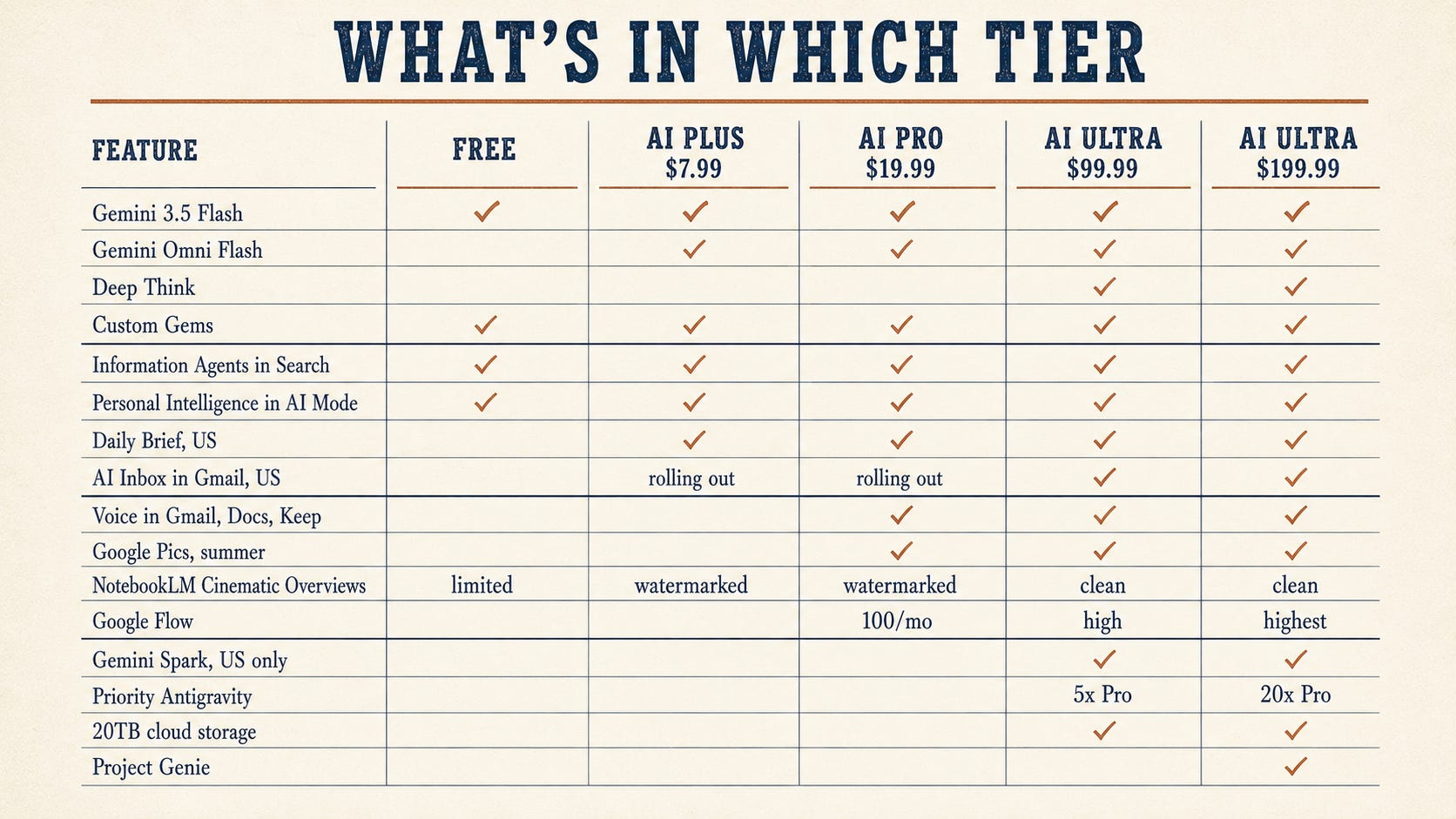
Workspace Business Standard, Plus, and Enterprise customers get most of the consumer features (Spark, Pics, voice, AI Inbox) in preview through the summer at no extra charge on top of seat pricing. The Cloud Next features (Workspace Intelligence, Sheets canvas with HubSpot/Salesforce, Vids avatars, Meet Take Notes for Me, Workspace Skills) are already enabled or are rolling out on the admin side for Business Standard and up.
💡 What This All Means
Here’s where I keep landing as I write this.
The agent shift is real, and Google just gave us the easiest on-ramp we’ve had. Spark isn’t a research preview locked behind a waitlist. It’s in Ultra at $99.99 starting next week for US subscribers. Information Agents in AI Mode are free, today, globally. The question isn’t whether agentic AI is coming to our work. It’s whether we’d rather learn it now, on something low-stakes like our weekly intake triage, or learn it in nine months when leadership asks why we haven’t.
The NotebookLM upgrade is the one I’d push hardest on this week. Cinematic Video Overviews from our existing source material change the math on every video production decision we make for the next quarter. If our team has been queuing up video projects due to cost or capacity constraints, that backlog just became walkable.
The prompting shift is the part that worries me most, because it’s invisible. Old prompts will still run on 3.5. They’ll just quietly underperform, and a lot of us won’t notice because the outputs will still look fine until we compare them carefully. If we maintain a prompt library (and we should), this is the quarter we audit it. Pull out anything with custom temperature settings. Strip the chain-of-thought scaffolding. Set thinking_level deliberately based on the task. Build Custom Gems for our highest-reuse patterns. The teams that do this work in May will look like they have better AI in July.
The subscription overhaul matters because it changes the buying conversation. If our org has been holding off on Ultra at $249.99, the math is different at $199.99 with Genie added, and very different at the new $99.99 entry point with Spark, Deep Think, and clean NotebookLM exports.
The Cloud Next features are the underrated half of this story. Workspace Intelligence, the Sheets canvas with real CRM imports, Vids avatars, and Meet’s universal note-taking all dropped a month ago, and most of us missed them in the daily grind. They’re already in our seats if our org runs Workspace Business Standard or higher. The fastest win for many of us this week is figuring out which of those are already enabled.
And the glasses. They’re not shipping until fall, but I want us to be thinking about them now. Hands-free, voice-driven, real-time translation, on-the-job microlearning. If we’re in field service, manufacturing, retail, healthcare, or any deskless workforce role, our 2027 training stack looks meaningfully different than our 2026 stack.
When I was running content scaling in my last role, what broke us wasn’t the technology. It was the gap between what was possible and what our team had time to learn. 12x growth in module output (from 50 to 637 modules in a year) happened because we forced ourselves to stay current with tools as they shipped, not when we eventually got around to them. This release is one of those moments. Worth carving out the hour this week.
📬 If This Was Useful
Hit subscribe below. Honest, specific, no fluff about what’s shipping and how to use it for L&D work. Subscribe at learningupgraded.com and grab our free guides while you’re there.
—Eian