
🤖 Claude May 2026: What Changed and Why L&D Teams Should Care
Opus 4.8 launched. Dynamic Workflows entered research preview. The billing change hitting June 15 that anyone running automated workflows needs to act on now.


☕ 8 minute read
Another Opus release. Another set of benchmark numbers. Another announcement that says “targeted improvement” instead of “generational leap.”
I want to talk about some things I don’t see others discussing as much, because “targeted” is useful wording. It means there are specific workflows where this upgrade changes the math, and others where it doesn’t. The L&D work that benefits most from Opus 4.8 differs from the work we’d send to Sonnet 4.6, and getting that distinction right is worth more than knowing the SWE-bench score.
We’re going to walk through what shipped in May, filter out the noise, and land on what to do differently starting this week. There’s also a billing change hitting June 15 that anyone running automated Claude workflows needs to act on now, not after it breaks something.
📋 TL;DR
Claude Opus 4.8 launched May 28, same price as 4.7: roughly four times less likely to let flaws in its own work slip past unreported, which is the reliability improvement that matters for L&D pipelines
Dynamic Workflows (research preview in Claude Code) spawns tens to hundreds of parallel subagents; it’s now available on all paid plans including Pro, and there’s no slash command, you ask for it in plain language
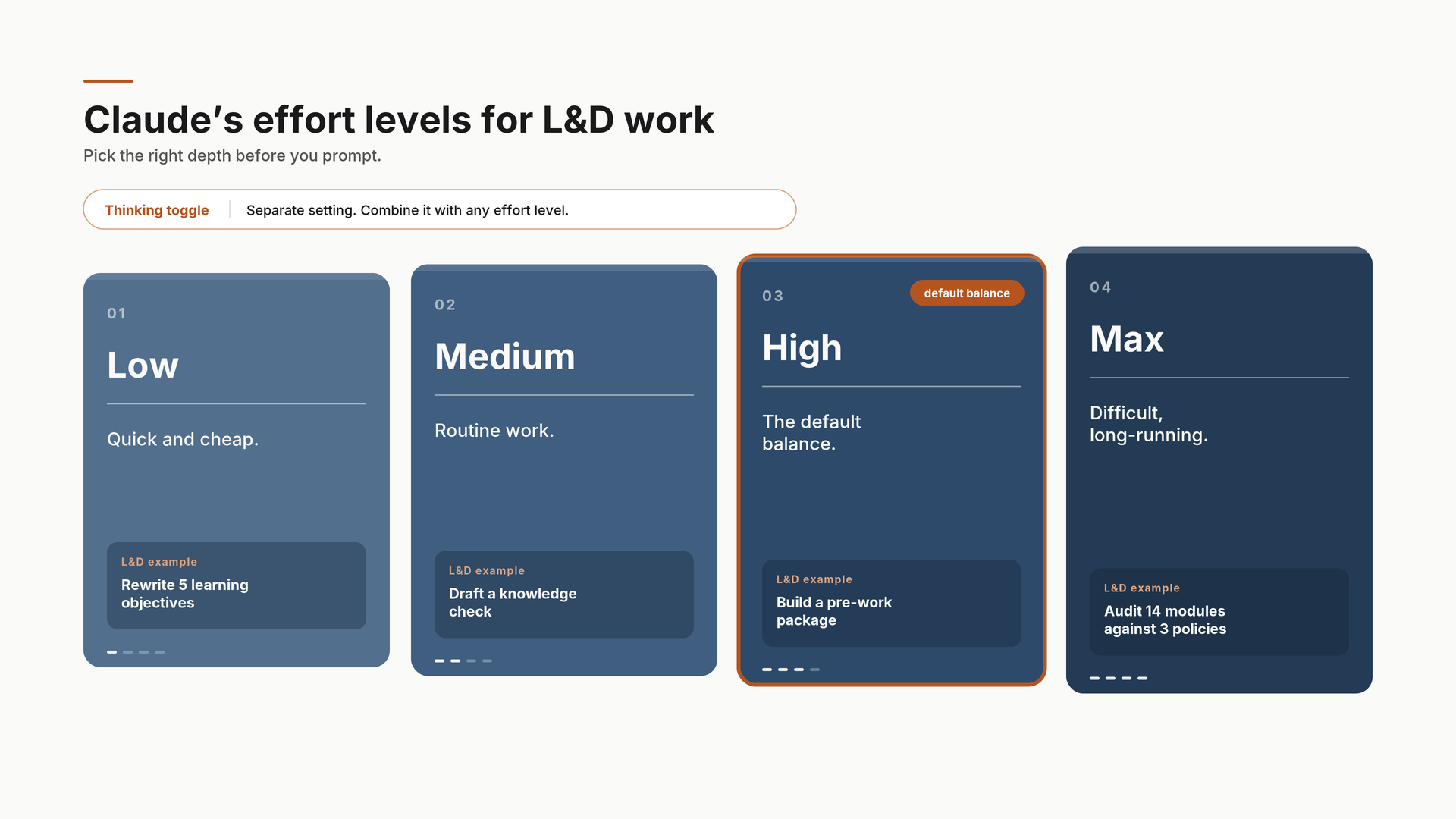
Effort control is live in claude.ai and Cowork on all plans: four levels (Low, Medium, High, Max) plus a separate Thinking toggle, which changes the cost math on every prompt we send
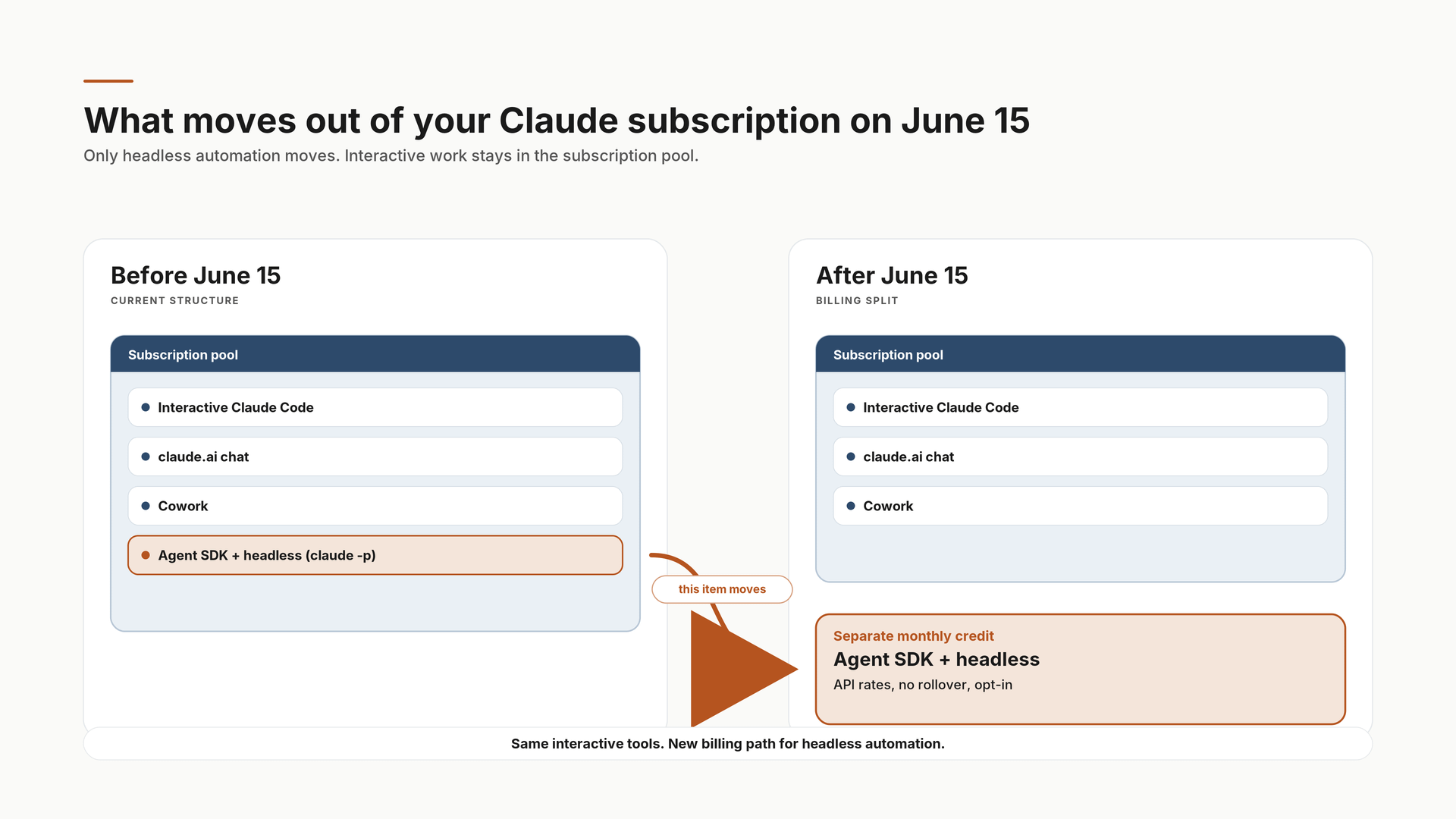
Agent SDK and headless usage move off subscriptions to usage-based credits on June 15: audit your automations before it’s an invoice surprise
🧭 A Note on the Labels in This Article
Every example below carries a “Run in” line using the exact names in the Claude. ai interface. Click the model name next to the send button, and you’ll find Effort with four levels: Low, Medium, High, Max (the model’s recommended level shows a “Default” badge; Opus 4.8 defaults to High). Thinking is a separate toggle within the same Effort menu, and you can combine any effort level with Thinking, on or off. Anthropic’s published guidance still recommends XML-tagged prompts for complex work, which is why the prompts below look the way they do.
🆕 What Shipped in May
1. Claude Opus 4.8 (May 28)
What came out: Anthropic released Claude Opus 4.8 on May 28, at the same price as Opus 4.7 ($5 input / $25 output per million tokens). The headline improvement is agentic reliability rather than raw capability: by Anthropic’s measure, the model is around four times less likely to let flaws in code it has written go unnoticed, and its alignment scores have improved meaningfully. The end-to-end claim that's being quoted everywhere (“the only model to complete every case on the Super-Agent benchmark”) comes from Genspark, a customer, about their own benchmark. Worth knowing the source when you repeat it in a leadership deck.
How you use it: Select Opus 4.8 from the model picker in Claude.ai, Cowork, or Claude Code. The self-checking behavior was measured on code, but the pattern we’ve seen carries to long autonomous content work: it flags its own uncertainty more, asks better questions before big changes, and produces fewer confident errors that sail through review. Confident errors are the expensive kind, because review is exactly where they don’t get caught. One prompting note from Anthropic’s updated guidance: Opus 4.8 follows instructions more literally than its predecessors, so state scope explicitly and prefer positive examples over lists of don’ts.
Example 1: Instructional designer, compliance catalog audit. Three policies updated in Q1, fourteen modules that may need changes, and SME hours on the line if the triage is wrong:
Run in: claude.ai or Cowork · Claude Opus 4.8 · Effort: Max · Thinking: On. Max is built for exactly this: difficult, longer-running analysis where a misclassification costs SME hours.
<context>
I am an instructional designer auditing a compliance training catalog.
Three policies were updated in Q1 2026:
[PASTE POLICY UPDATE SUMMARIES HERE; bullet points from the compliance team are fine]

I have 14 existing compliance modules. Learning objectives and key content
points for each are below.
</context>

<task>
Analyze each module against the three policy updates. Categorize each as:
1. Direct conflict (content is now factually incorrect)
2. Partial conflict (content is outdated but not wrong)
3. Missed reinforcement (no conflict, but new policy language should be added)
4. No impact
</task>

<thinking>
Before categorizing any module, identify the specific clause in the policy
update that is relevant. Do not categorize based on topic overlap alone.
If uncertain whether a module is impacted, flag it as uncertain rather than
forcing a category.
</thinking>

<constraints>
- Flag uncertainty rather than guess
- Do not recommend remediation steps; only categorize impact
- If a module falls in categories 1 AND 2, note both
</constraints>

<output_format>
Table: Module Name | Category | Policy Reference | Confidence | Notes
Followed by: prioritized update sequence (Category 1 first) with estimated
effort per module (Minor edit / Section rewrite / Full rebuild)
</output_format>
Example 2: Trainer, post-program feedback synthesis. The same reliability matters when the input is messy human feedback instead of policy text:
Run in: claude.ai or Cowork · Claude Opus 4.8 · Effort: High (default) · Thinking: On
<context>
I ran a 6-week manager development cohort. I have three feedback sources:
[PASTE: post-session pulse survey comments]
[PASTE: final program evaluation open responses]
[PASTE: facilitator debrief notes]
</context>

<task>
Synthesize across all three sources:
1. PATTERNS: Themes appearing in at least two of the three sources, with
   a direct quote from each source that supports it
2. SINGLE-SOURCE SIGNALS: Strong themes appearing in only one source,
   flagged as unconfirmed
3. CONTRADICTIONS: Anywhere participant feedback and facilitator notes
   disagree. Surface it, do not resolve it.
4. TOP 3 CHANGES for the next cohort, each tied to specific evidence above
</task>

<constraints>
- Never present a single enthusiastic comment as a theme
- If the evidence is thin for any recommendation, say so in the
  recommendation itself
</constraints>
What to expect: Structured output with confidence flags on the uncertain calls. The compliance audit replaces a 2-3 hour triage meeting with a 30-minute review; the feedback synthesis keeps one loud participant comment from becoming the next cohort’s redesign. Save both outputs as your change records.
2. Dynamic Workflows in Claude Code (Research Preview, May 28)
What came out: Dynamic Workflows ships inside Claude Code: the CLI, the desktop app, and the VS Code extension. It lets Claude spawn tens to hundreds of parallel subagents in a single run (up to 16 working concurrently, 1,000 per run), attack a problem from multiple angles at once, deploy adversarial agents to challenge its own findings, and keep iterating until the answers converge. It launched on Max, Team, and Enterprise, and has since expanded to all paid plans, with Pro users opting in through the Dynamic workflows row in /config. You’ll need Claude Code v2.1.154 or later.
How you use it: There is no /dynamic-workflows command, which is what we got wrong the first time we tried it. You trigger a workflow three ways: ask in plain language (”create a workflow to...”), include the keyword ultracode in your request, or set /effort ultracode, a Claude Code setting that runs the model at xhigh effort and has it orchestrate workflows for substantive tasks on its own. Manage running workflows with /workflows. The research preview label is real: orchestration may still change, so test it on real content, but don’t build production dependencies on it yet.
Example 1: Instructional designer, full onboarding path build. In Claude Code, type this as a normal message:
Run in: Claude Code (CLI, desktop, or VS Code) · Claude Opus 4.8 · the ultracode keyword triggers the workflow · any paid plan (Pro: enable in /config)
ultracode

Build a complete 4-module onboarding path for a new Sales Development
Representative role.

Source materials: [paste or attach job description, competency framework,
any existing onboarding notes]

Deliverables per module:
- 3 learning objectives (Bloom’s Application or Analysis level)
- 5-point content outline
- 3 scenario-based knowledge checks with distractors
- Facilitator debrief questions

Quality gates: Flag any objective that uses “understand” or “know.”
Flag any scenario that tests recall rather than application.
Surface conflicting information across source materials rather than
resolving it silently.

Use adversarial review: have agents challenge the knowledge checks for
answer-key leakage and implausible distractors before finalizing.
Example 2: L&D consultant or learning manager, deep research with the bundled command. Dynamic Workflows ships with /deep-research built in, a multi-agent research run that fans out searches, cross-checks sources, and returns a cited report:
Run in: Claude Code · Claude Opus 4.8 · /deep-research command (the workflow manages its own subagent effort)
/deep-research

Question: What does the current evidence (2024-2026) say about measuring
behavior change from leadership development programs, beyond self-report
surveys?

Scope: peer-reviewed where available, plus major industry research
(ATD, LinkedIn Learning, Brandon Hall). Exclude vendor marketing content.

I need: the 4-6 measurement approaches with the strongest evidence, what
each costs in practical effort, and where the research is thin or
contradictory. Cite every claim.
What to expect: The onboarding build runs longer than a normal prompt and returns with the internal disagreements surfaced rather than smoothed over, which is the point. The research run replaces the half-day we’d normally spend assembling sources before writing a recommendation. Check the citations anyway. That habit doesn’t retire.
3. Effort Control in Claude. ai and Cowork
What came out: A control next to the model selector now adjusts how much effort Claude puts into a response, available on all Claude.ai plans and Cowork, for Opus 4.8, 4.7, 4.6, and Sonnet 4.6. Anthropic’s own descriptions: Low and Medium for routine tasks that stretch usage further, High for the best overall balance, Max for difficult and longer-running work. In Claude Code, the same idea runs through /effort, with levels low, medium, high, xhigh, and max, plus fast mode (/fast) at 2.5x speed, now three times cheaper than on previous models.
How you use it: Click the model name next to the send button, pick the effort level, and toggle Thinking as needed. The practical rule we’ve settled on: if the output goes in front of a leadership audience or gets built into a course, run High or Max with Thinking on. If it’s a quick internal draft, run Low and bank the rate limits. We’re finally in control of that trade-off instead of paying for max reasoning on every prompt.
Example 1: Low-effort, quick tasks. Small ask, no ceremony:
Run in: claude.ai · Claude Sonnet 4.6 · Effort: Low · Thinking: Off
Rewrite these 5 learning objectives so each starts with an observable verb
at Bloom’s Application level or higher. Keep each under 20 words.

[PASTE OBJECTIVES]
Example 2: High effort, the work that has to hold up. Trainer building pre-work for a half-day feedback workshop, where tone and constraint-following decide whether participants show up prepared or defensive:
Run in: claude.ai or Cowork · Claude Sonnet 4.6 · Effort: High · Thinking: On. Sonnet handles structured generation; save Opus 4.8 for analysis.
<context>
I am designing a half-day leadership workshop on giving and receiving feedback.
Participants: mid-level managers, 3-8 direct reports, varying experience with
feedback frameworks. Session: 4 hours, hybrid delivery, 12 participants.
</context>

<task>
Create a pre-work package participants complete in the 5 days before
the workshop.
</task>

<constraints>
- Total pre-work time: 20-30 minutes maximum
- No lecturing or information dump; this prepares, it does not teach
- Must surface prior experience, not introduce frameworks
- Should normalize that feedback is hard, not assume it’s a skill gap
- Do not mention SBI, radical candor, or any framework we will cover in session
- Tone: peer-to-peer, not corporate
</constraints>

<output_format>
Three standalone components, each with a header and brief participant
instructions:
1. One reflection prompt (open-ended, designed to surface a real memory,
   150-200 words to write)
2. One self-assessment (5 questions, 1-5 scale, one open-ended follow-up)
3. One pre-read summary (250-300 words on the tensions in feedback,
   not a how-to)
</output_format>
What to expect: The objectives rewrite comes back in seconds and barely touches your rate limits. The pre-work package takes longer and holds every constraint, which is what the extra effort buys. One editing pass for voice and it’s participant-ready, 60-90 minutes saved against building from scratch.
4. Agent SDK Usage Moves Off Subscriptions (June 15)
What came out: Effective June 15, Claude Agent SDK and claude -p (headless) usage exits the Pro, Max, Team, and Enterprise subscription pools. It moves to a separate monthly dollar credit, billed at standard API rates, no rollover, per user, with a one-time opt-in. The credit roughly mirrors the plan fee on Pro and Max; Team and Enterprise credits vary by seat type, so check your tier rather than assuming. Interactive Claude Code sessions, Claude. ai chat, and Cowork are unaffected.
How you use it: This one’s an audit, and it’s this week’s action item. If anyone on the team built automated Claude workflows, a course outline generator, an assessment builder, a content review pipeline running on a schedule, the flat subscription was effectively unlimited for those. Usage-based credits are not.
Example 1: Find what you’re running. Paste into Claude (or hand to whoever set up your automations):
Run in: claude.ai · Claude Sonnet 4.6 · Effort: Medium · Thinking: Off
Help me audit our Claude automations before the June 15 billing change.

Walk me through finding, on a Mac:
1. Any scheduled jobs (cron, launchd) that call “claude -p” or the
   Claude Agent SDK
2. Any GitHub Actions workflows in our repos that authenticate with a
   Claude subscription
3. Any n8n or Zapier workflows hitting Claude headlessly

For each thing we find, I’ll paste it back to you. Build me a table:
automation name | what it does | how often it runs | rough tokens per run.
Example 2: Estimate the exposure. With your last 30 days of usage in hand:
Run in: claude.ai · Claude Opus 4.8 · Effort: High (default) · Thinking: On. The cost modeling is worth the stronger model.
Here is our automation inventory and 30 days of usage:
[PASTE TABLE FROM THE AUDIT]

Our plan: [Pro / Max 5x / Max 20x / Team]

Estimate monthly cost at standard API rates ($5 input / $25 output per
million tokens for Opus 4.8; $3/$15 for Sonnet 4.6). Flag any automation
likely to exceed the monthly credit on its own, and suggest which ones
could drop from Opus to Sonnet without quality risk.
What to expect: Most small teams will find the credit covers them. The ones who won’t are exactly the ones who automated enthusiastically, and finding out now beats finding out on an invoice.
Also Worth Knowing from May
Two smaller items from the Code with Claude event (May 6) that didn’t make headlines but changed daily work. Claude Code’s 5-hour rate limits doubled across all paid plans, and the peak-hours throttle is gone, so the “rate limited mid-build” afternoon mostly retires. The remote control is shipped for all of us. Start a Claude Code session on the desktop, then continue it on your phone. For those of us who kick off a content build before a meeting and want to check it from the hallway, that’s the feature. I have used this while I was waiting for a movie to start this weekend.
💡 What This All Means
The reliability story is the one worth sitting with. Four times fewer unreported flaws were measured on code, but the failure mode it targets is universal: Claude working autonomously on our behalf, producing content, auditing materials, building assessments, and deciding it’s confident when it shouldn’t be. That failure costs L&D teams real time because it gets through review. Opus 4.8 surfaces its own uncertainty more, and for anyone running autonomous content workflows, that alone justifies switching now.
Dynamic Workflows is the architecture to watch. If it stabilizes over the next month, “how long does a full learning path build take?” gets a very different answer. We’re not there yet. But it’s close enough to start testing, and it’s on Pro plans now, so the entry fee dropped.
The June 15 credit change is the action item this week. Not next month. This week.
The Claude AI and Cowork Guide walks through exactly this, which model for which task, how to structure prompts that hold, and how to build L&D workflows that don’t break at scale. 15 parts, free at learningupgraded.com/resources.
—Eian