
ChatGPT + Codex May 2026: A New Default Model, Spreadsheets Done Right, and a Job Search Tool Worth Talking About
GPT-5.5 Instant is the new default. ChatGPT now lives inside Excel and Google Sheets. Codex became an autonomous agent. And a built-in job search tool just changed what career transition training look

☕ 8-minute read
I want to talk about some things I don’t see others discussing as much.
OpenAI shipped a new default model, brought ChatGPT directly into Excel and Google Sheets, and matured Codex into a real autonomous agent. All of that got coverage. But the thing that caught us off guard landed quietly on June 1, two days after May closed: ChatGPT now has a built-in job-search and resume-tailoring tool. Free through Pro, available in the US right now, and almost nobody in our field is connecting it to our work.
That tool reads like consumer news. Look closer, and it’s a signal about the audience we design for. When learners in career transition programs have an AI-native job search built into the tool they already open every day, our curriculum has to account for it.
We’ll get to all of it. Let’s start with the model switch.
📋 TL;DR
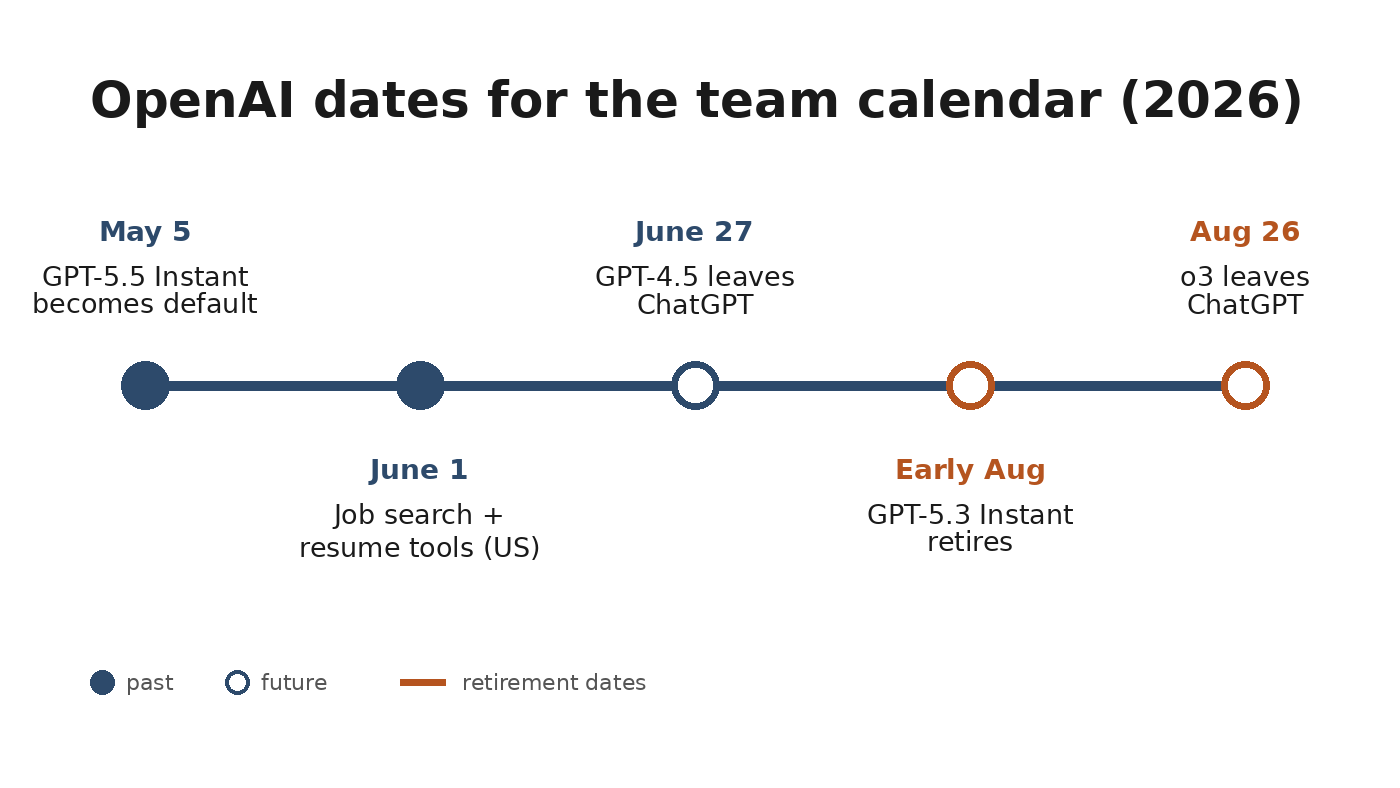
GPT-5.5 Instant is the new default for every ChatGPT tier as of May 5: 52.5% fewer hallucinated claims on high-stakes prompts, better reliability for compliance and certification content
ChatGPT for Excel and Google Sheets went GA May 5 on all plans: training data analysis and tracker building inside the spreadsheet, no export required
Codex shipped Goal Mode (the /goal command, GA May 21) and Appshots on macOS: it’s matured from code generator to autonomous agent runtime, and non-developers can use it
ChatGPT added live job search and resume tailoring (US, June 1): the most underreported L&D-relevant release of the cycle. GPT-4.5 leaves ChatGPT June 27, and o3 leaves August 26, so update any docs that name them
🧭 A Note on the Labels in This Article
Every example below carries a “Run in” line with the exact model and mode names you’ll see on screen. In ChatGPT’s model picker, the options are Auto, Instant, and Thinking (the full model names are GPT-5.5 Instant and GPT-5.5 Thinking; paid plans can pick manually, and GPT-5.5 Pro sits above those on Pro and Business plans). The quick rule we use: Instant for drafting and routine tasks, Thinking for anything where wrong-but-confident is expensive.
🆕 What Shipped
1. GPT-5.5 Instant: New Default Model (May 5)
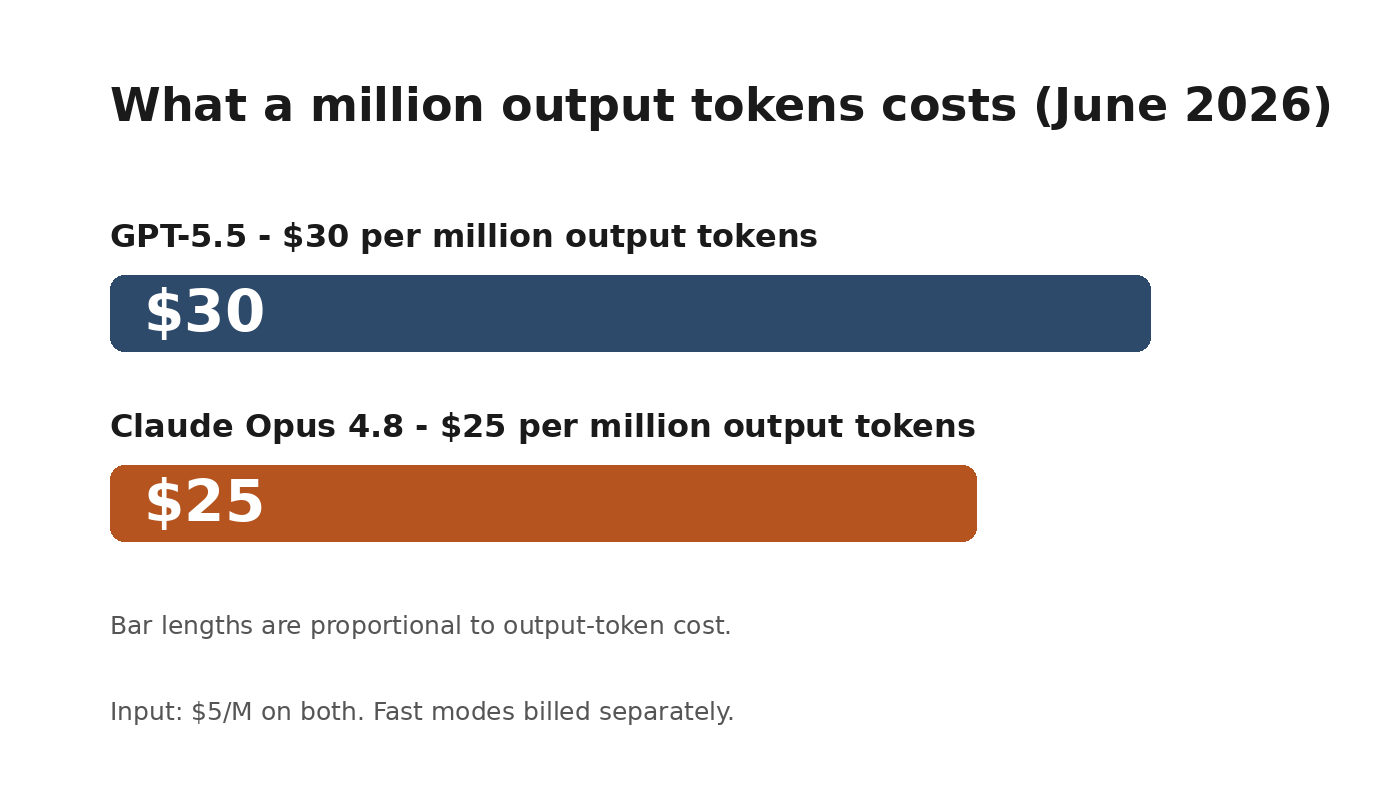
What came out: GPT-5.5 Instant replaced GPT-5.3 Instant as the default across all ChatGPT tiers on May 5. Paid users can still pick GPT-5.3 Instant from the model menu for three months before it retires. API pricing at the standard tier: $5 per million input tokens, $30 per million output tokens (prompts over 272K input tokens are billed higher, which matters if you feed it entire course catalogs).
How you use it: Nothing to switch on. Open ChatGPT, and it’s already the model answering you. The improvement that matters most for our work: 52.5% fewer hallucinated claims on high-stakes prompts in OpenAI’s evals (medicine, law, finance), and 37.3% fewer inaccurate claims on conversations users flagged as difficult. It still hallucinates. Everything that ships to learners still needs a review pass. But the error rate dropped enough to raise the quality bar for first drafts, especially for compliance and certification content, where a confident wrong answer is the expensive kind.
One format note: OpenAI’s own GPT-5.5 prompting guide recommends short, outcome-first prompts with a Role line and clear sections, over long step-by-step process instructions. The prompts below follow that template.
Example 1: Instructional designer, scenario-based assessment bank. Product knowledge certification for 200 sales reps, thirty scenario questions across five product lines. Writing thirty questions is easy. Writing thirty that don’t all feel like the same template is the hard part. Run this once per product line:
Run in: ChatGPT · model picker: Thinking (GPT-5.5 Thinking) · Plus or higher. The distractor logic is where Instant cuts corners.
Role: Instructional designer specializing in scenario-based assessment design.

# Goal
Create 6 scenario-based assessment questions for [PRODUCT LINE NAME] that
certify application of product knowledge, not recall of facts.

# Context
- Product: [DESCRIBE YOUR PRODUCT; 2-3 sentences]
- Learner: B2B sales representative, 6-18 months tenure
- Bloom’s level: Application and Analysis

# Success criteria
- Each question: a 3-5 sentence realistic customer scenario, then 4 answer
  choices (1 correct, 1 plausibly correct but wrong for a specific reason,
  2 clearly wrong for different reasons)
- Each question includes a Designer Note: why the correct answer is correct
  and what misconception the plausible distractor targets
- Scenarios include friction; realistic sales conversations are not ideal ones

# Constraints
- No two scenarios use the same customer type (vary: enterprise buyer,
  SMB owner, procurement manager, end user, skeptical technical evaluator)
- Never use “Which of the following is correct” as the stem

# Output
Table: Question # | Scenario | Stem | Choices A-D | Correct | Designer Note
Example 2: Trainer, fact-check pass on compliance content. Before a SME review, use the lower hallucination rate as a first screening layer, never the final one:
Run in: ChatGPT · model picker: Thinking (GPT-5.5 Thinking) · Plus or higher
Role: Compliance content reviewer screening a training draft before SME review.

# Goal
Find every factual risk in this draft by comparing it against the policy
source. Do not rewrite anything.

# Inputs
Draft: [PASTE MODULE DRAFT OR SCRIPT]
Policy source: [PASTE THE CURRENT POLICY TEXT OR SUMMARY]

# Output
1. CONFLICTS: every statement in the draft that contradicts the policy
   source. Quote both sides.
2. UNSUPPORTED: every factual claim in the draft that does not appear in
   the policy source at all. These go to the SME as questions.
3. DATES AND NUMBERS: every date, threshold, dollar figure, and deadline
   in the draft, flagged Verified in source / Not in source.

# Stop rules
If you are uncertain whether something conflicts, list it under UNSUPPORTED
and say why. Do not soften findings.
What to expect: The SME meeting will be shorter because they will review a flagged list rather than re-read the whole module. The 80% of the drafting work is done, and the accountability remains human.
2. ChatGPT for Excel and Google Sheets: GA on All Plans (May 5)
What came out: ChatGPT now works natively inside Excel and Google Sheets as a sidebar, generally available May 5 on every plan, including Free, powered by GPT-5.5. It builds, updates, and explains multi-tab spreadsheets with working formulas. Edu and Teacher workspaces are admin-gated, so check with IT if yours doesn’t show.
How you use it: Install the add-in from the Excel or Google Sheets add-on store, sign in with your ChatGPT account, and the sidebar appears next to your sheet. It reads the workbook you have open, so it prompts reference to your real columns instead of a pasted sample. For us, this is where training data lives: completion exports, assessment scores, evaluation survey results, and budget trackers.
Example 1: Training manager, quarterly completion analysis. With your LMS completion export open in the sheet:
Run in: ChatGPT for Excel / Google Sheets sidebar (GPT-5.5) · any plan, admin-gated on Edu
# Goal
Build a “Q2 Analysis” tab from this workbook that a leadership audience can
read in 5 minutes.

# Context
Tab 1 = raw completions (one row per learner per course).
Tab 2 = course catalog with owner and audience.

# Output
1. Completion rate by department, sorted lowest to highest
2. Average days-to-complete by course
3. A flag column for any course below 70% completion AND past its due date
4. One pivot-style summary I can screenshot for a leadership update

# Constraints
Do not modify the raw tabs. Explain any formula you use in a cell comment
so my coordinator can maintain this without me.
Example 2: L&D consultant, needs-analysis tracker from scratch. Starting a client engagement with a blank sheet:
Run in: ChatGPT for Excel / Google Sheets sidebar (GPT-5.5) · any plan
# Goal
A training needs analysis tracker my client can maintain after the
engagement ends.

# Output
Tab 1 “Stakeholders”: name, role, interview date, status, key concerns
  (text), priority dropdown (High/Medium/Low)
Tab 2 “Findings”: finding, source stakeholder, category dropdown
  (Skill gap / Process gap / Tool gap / Motivation), evidence strength (1-3)
Tab 3 “Dashboard”: count of findings by category, findings with 2+
  stakeholder sources highlighted, open interviews remaining

# Constraints
Data validation for all dropdowns. Conditional formatting: High priority
rows in Tab 1 get a light amber fill. Printable on one page per tab.
What to expect: A working multi-tab tracker in minutes that used to take an afternoon of formula fiddling. The “explain formulas in comments” line is the difference between a deliverable your client can maintain and one that breaks the week after you leave.
3. Codex: Goal Mode + Appshots (May 21)
What came out: Codex matured from a code generator into a persistent autonomous agent runtime. The /goal command went GA on May 21: describe an outcome rather than a task, and Codex plans and executes the steps, with the goal persisting across interruptions and session breaks. OpenAI’s own guidance: write goals so Codex can tell whether it has succeeded, with a specific outcome or measurable target baked in. MCP support expanded through May, and in Appshots on macOS, you can attach any app window to a Codex thread by pressing both Command keys.
How you use it: Codex runs as a Mac app, a CLI, or in the browser, on Plus and higher. The model is plain gpt-5.5 (pick it with /model), with reasoning effort levels of low, medium, high, and xhigh; medium is the default, and OpenAI recommends high for harder autonomous tasks. Goal Mode is the feature that brings Codex into non-developer territory: an instructional designer who can describe an outcome with success criteria is now a viable Codex user.
Example 1: Instructional designer, knowledge check bank.
Run in: Codex (Mac app or CLI) · model: gpt-5.5 · effort: high · start with /goal
/goal Create a complete knowledge check bank for a 4-module product
knowledge course. Done means: one xlsx file per module saved as
knowledge-check-bank-[module-name].xlsx, every question passing the
quality checks below.

Source materials: [attach or paste course content outline]

Per module:
- 8 questions mixing multiple choice (5) and scenario-based (3)
- Each question: stem, 4 answer choices, correct answer, rationale,
  Bloom’s level
- Scenario questions describe a realistic situation rather than testing
  recall of a definition

Quality checks (must pass before done):
- No question uses “which of the following” as the stem
- No scenario where the customer or situation is implausibly ideal
- No two scenarios in a module share the same customer type
Example 2: Learning manager, recurring report automation. The goal persists, so Codex picks the work back up instead of restarting:
Run in: Codex (Mac app or CLI) · model: gpt-5.5 · effort: high · start with /goal
/goal Build and maintain a weekly training operations report. Done each
week means: report-YYYY-MM-DD.xlsx plus a 5-bullet plain-text summary
produced from the latest CSV, with all flags below applied.

Every Friday, using the completion CSV I drop into /reports/input:
1. Compare against last week’s file; calculate week-over-week completion
   change by program
2. Flag any program where completion dropped more than 5 points
3. List learners newly past their compliance due date

Stop rule: If the input file structure changes, tell me what changed
before processing. Do not silently adapt.
What to expect: The first run takes setup and correction. By the third week, it’s a five-minute review instead of a 90-minute Friday ritual. The stop rule matters: agents that silently adapt to changed data are how reporting errors get into leadership decks.
4. ChatGPT Live Job Search + Resume Tools (June 1, Late-Breaking)
What came out: ChatGPT now surfaces live job listings from Indeed, Upwork, Appcast, and the web, personalized to the user’s experience, skills, and goals. Users can upload or create a resume in ChatGPT, tailor it to a specific role, and download it as a formatted resume. Rolled out June 1-2, so this is days old. Available in the US on Free, Go, Plus, and Pro; resume formatting is available globally on the web for all plans.
How you use it: Ask ChatGPT about job searching, and the listings experience appears in the conversation; the resume tools live in the same flow. For L&D, the point cuts two ways. Anyone designing career transition or outplacement programs now has learners with an AI-native job search built into a tool they already use, and our curriculum either teaches them to use it well or pretends it doesn’t exist. And anyone designing AI adoption training has a clean example of AI shifting from “a tool you visit” to “infrastructure inside daily tasks.”
Example 1: L&D consultant, career transition workshop design.
Run in: ChatGPT · model picker: Thinking (GPT-5.5 Thinking) · Plus or higher. Participants only need to be free for the in-session exercise.
Role: L&D consultant designing a practical career transition workshop.

# Goal
A 3-hour virtual workshop where 15-25 restructuring-affected employees
leave with a tailored resume and a list of real roles to apply to.

# Context
- Industry: [CLIENT INDUSTRY]
- Roles being eliminated: [ROLE TYPE, e.g., mid-level operations coordinator]
- Transferable skills: [LIST 3-5 COMMON SKILLS]
- Participant AI literacy: low to moderate; most have not used ChatGPT
  for job searching
- Participants are anxious, not tech-resistant. Design for confidence
  through a completed task.

# Output
1. SESSION FLOW: agenda with time blocks and activity types
   (instruction / demonstration / practice / reflection)
2. HANDS-ON EXERCISE: step-by-step sequence participants complete live
   using ChatGPT’s built-in job search and resume tools: (a) input
   transferable skills and identify 5 target role types, (b) find 3-5
   live listings that match, (c) tailor the resume to one specific role,
   (d) download and save the output
3. FACILITATOR NOTES: for each hands-on step, where people get stuck and
   how to redirect without taking over their screen
4. FOLLOW-UP PLAN: a 2-week self-managed action plan using ChatGPT
   independently after the workshop
Example 2: Trainer or career coach, the participant-facing exercise itself. Hand this to participants as the in-session worksheet prompt; they paste it into their own ChatGPT:
Run in: ChatGPT · model picker: Auto or Instant · works on Free (US for job search)
# Goal
Help me run a focused job search after a restructuring, one step at a time.

# About me
- Most recent role: [TITLE], [X] years
- Three things I was responsible for: [LIST]
- Skills colleagues came to me for: [LIST 2-3]
- Constraints: [LOCATION / REMOTE / SALARY FLOOR / INDUSTRY PREFERENCES]

# Steps (wait for my answer between each)
1. Suggest 5 role types that fit my experience, including 2 I might not
   have considered. One sentence each.
2. When I pick 2-3, find current live listings that match my constraints.
3. For the listing I choose, tailor my resume to it. Ask me for my current
   resume first. Show me what you changed and why.

# Constraints
Be direct about gaps between my experience and what listings ask for, and
suggest how to address each gap honestly rather than papering over it.
What to expect: The one-step-at-a-time structure keeps anxious participants from being buried in output. The honesty constraint at the end is the part we’d defend hardest: a resume that papers over gaps fails in the interview, and participants know it.
5. Model Retirements: GPT-4.5 (June 27) and o3 (August 26)
What came out: GPT-4.5 leaves ChatGPT on June 27, 2026. o3 leaves on August 26. These are ChatGPT product changes; this announcement doesn’t touch the API (GPT-4.5 already left the API back in 2025).
How you use it: This one’s housekeeping, and outdated AI tool guidance is a specific credibility problem in L&D. It signals we’re teaching tools we haven’t tested recently. Two quick passes worth running this week.
Example 1: Audit your own docs. Drop your AI guidance docs, job aids, or onboarding decks into ChatGPT:
Run in: ChatGPT · model picker: Instant (GPT-5.5 Instant) · any plan
# Goal
Find every stale AI model reference in these documents.

# Task
Flag every mention of: GPT-4.5, o3, GPT-4o, DALL-E, GPT-5.3, or any model
name with a version number. For each: document name, the sentence it
appears in, and whether the reference is (a) retiring or retired,
(b) current but worth date-stamping, or (c) fine as historical context.

# Output
A table I can work through top to bottom.
Example 2: Draft the team heads-up.
Run in: ChatGPT · model picker: Instant (GPT-5.5 Instant) · any plan
# Goal
A short Teams message to an L&D team: GPT-4.5 retires from ChatGPT
June 27, o3 retires August 26.

# Must include
What happens to saved chats that used those models (they remain; future
replies use current models), what to update (any SOP or job aid naming
them), and who to contact: [NAME].

# Constraints
Practical heads-up between colleagues, not an IT compliance bulletin.
Under 120 words.
💡 What This All Means
OpenAI’s May was consolidation plus quiet distribution. GPT-5.5 Instant is a reliability improvement rather than a capability leap, and reliability is what compliance and certification work runs on. The spreadsheet GA is the sleeper: most training data already lives in Excel, and the analysis now happens where the data sits.
Codex with Goal Mode is the one to watch over the next two quarters. The early version of autonomous multi-step content automation is here, and the practitioners experimenting with it now will set the patterns everyone else adopts later.
The job search tool is where we’d push back on anyone calling it a consumer story. When learners have an AI-native job search within the tool they use daily, a career transition curriculum that ignores it is already out of date. The practitioner who builds a workshop around that tool this month is ahead of the one who pretends it isn’t there.
One cost note for leadership conversations: GPT-5.5’s output pricing ($30 per million tokens) is higher than Claude Opus 4.8's ($25 per million tokens) at equivalent capability. For teams building automation at scale, that difference compounds over months. Worth knowing before platform decisions get locked in.
If we’re building L&D programs around AI tool adoption for learners, not just using AI ourselves, that’s the work we do at Learning, Upgraded. learningupgraded.com
—Eian